Guides
utils.downloadFile Not Working in Retool Mobile: How to Fix It
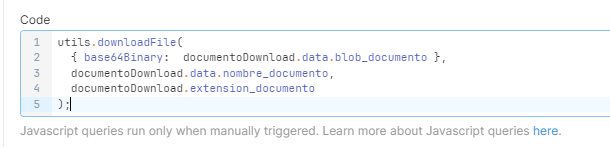
utils.downloadFile not working in Retool mobile is one of those bugs that's especially frustrating — your queries run successfully, no errors are thrown, and yet no file ever appears on your phone or in preview mode. If you're trying to download PDFs, DOCX files, JPEGs, or other file types from a Retool native mobile app, this guide explains exactly why it fails and how to fix it.
What Is utils.downloadFile and Where Does It Work?
utils.downloadFile is a Retool utility function that lets you trigger a file download directly from a query or event handler. You pass it file data along with a filename and MIME type, and Retool handles the download prompt for the user. It's the standard way to let users export data, download documents, or save images from within a Retool app.
The important distinction: utils.downloadFile is supported in Retool native mobile apps. Web app support was still being developed at the time this issue was widely reported. If you're building a mobile app and the function isn't working, the problem is almost certainly not the function itself — it's how you're passing the file data to it.
Why utils.downloadFile Silently Fails on Android and iOS
The most common cause of utils.downloadFile failing in Retool mobile — with no error, no download prompt, and no feedback — is wrapping the binary data in an object when it should be passed directly.
Specifically, developers often write something like this:
- Querying a backend that returns a blob, e.g.
documentoDownload.data.blob_documento - Passing it to
utils.downloadFilewrapped in an object:{ base64Binary: documentoDownload.data.blob_documento }
That wrapper object format is not what utils.downloadFile expects in a mobile context. Retool's mobile runtime doesn't unwrap the base64Binary key the same way the web runtime might handle it — so the function receives malformed data and silently does nothing.
The Fix: Pass the Base64 Data Directly
The solution is straightforward. Instead of wrapping your binary data, pass the value directly as the file data argument to utils.downloadFile.
Before (broken):
utils.downloadFile({ base64Binary: documentoDownload.data.blob_documento }, "myfile.pdf", "application/pdf")
After (working):
utils.downloadFile(documentoDownload.data.blob_documento, "myfile.pdf", "application/pdf")
By removing the { base64Binary: ... } wrapper and passing documentoDownload.data.blob_documento directly, Retool mobile can correctly interpret the base64-encoded binary and trigger the file download.
Step-by-Step: How to Set Up utils.downloadFile for Retool Mobile
- Step 1: Create a query that fetches your file data from your backend or storage (S3, a database BLOB column, an API, etc.). Confirm the query runs successfully and returns base64-encoded binary data.
- Step 2: In your event handler or a JavaScript query, call
utils.downloadFilewith three arguments: the raw base64 data, the desired filename (e.g."report.pdf"), and the correct MIME type (e.g."application/pdf"for PDFs,"image/jpeg"for JPEGs). - Step 3: Do not wrap the data in
{ base64Binary: value }. Pass the value directly:utils.downloadFile(yourQuery.data.yourField, "filename.pdf", "application/pdf"). - Step 4: Test in Retool's mobile preview mode first. If the download triggers in preview, it will work on a physical device as well.
- Step 5: Deploy to your Android or iOS device and confirm the file downloads and opens correctly.
Supported File Types for Retool Mobile Downloads
The utils.downloadFile function in Retool mobile supports a range of common file types. The ones most frequently used include:
- PDF files — MIME type:
application/pdf - Word documents (.doc, .docx) — MIME type:
application/mswordorapplication/vnd.openxmlformats-officedocument.wordprocessingml.document - JPEG images — MIME type:
image/jpeg - GIF images — MIME type:
image/gif - PNG images — MIME type:
image/png
Make sure the MIME type you pass matches the actual file format. A mismatch won't always throw an error but can cause the downloaded file to be unreadable.
Still Not Working? Check These Things First
- Is your Retool instance up to date? Mobile file download support was not available in older versions. Make sure you're on the latest release.
- Is the query actually returning data? Add a
console.logor inspect the query state to confirmyourQuery.data.yourFieldis populated before callingutils.downloadFile. - Are you testing on a native mobile app? If you're opening a Retool mobile app URL in a mobile browser rather than through the native Retool Mobile app, behavior may differ.
- Check device storage permissions. On Android, the app may need explicit permission to write files to device storage depending on OS version and configuration.
Summary
If utils.downloadFile is not working in your Retool mobile app, the most likely fix is removing the { base64Binary: ... } wrapper from your data argument and passing the base64 value directly. This one change resolves the silent failure most developers hit when trying to download PDFs, images, and documents on Android or iOS. Retool's mobile runtime expects the raw value — give it exactly that, and your downloads will work.
Ready to build?
We scope, design, and ship your Retool app — fast.