Tutorials
How to Trigger a Query Inside a Retool Module from the Parent App
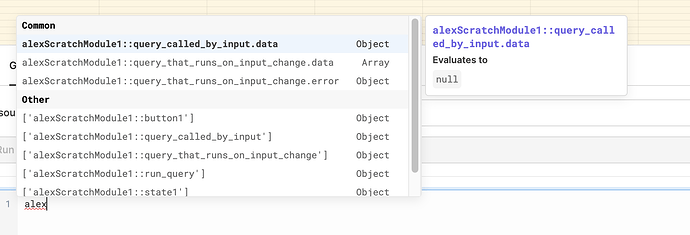
If you're trying to trigger a query inside a Retool module from the parent app, you've probably already discovered that the obvious approaches — like calling module queries directly via autocomplete — throw errors and don't behave as expected. This is one of the most common pain points as teams move to a module-based architecture in Retool, and the solution isn't immediately obvious from the docs. This guide walks you through exactly how to do it, including how to handle state resets so you can trigger the same action more than once.
Why You Can't Call Module Queries Directly from the Parent App
Retool modules are designed to be self-contained — they expose inputs, outputs, and event handlers to the outside world, but their internal queries are intentionally scoped inside the module. This is good for encapsulation, but it means you can't just write module1.myQuery.trigger() from the parent app and expect it to work. The autocomplete may suggest it, but it will throw an error at runtime.
The correct approach is to use module inputs as a signaling mechanism — passing a value into the module that the module itself watches, and then reacting to changes by running the internal query.
How to Trigger a Module Query from the Parent App (Step-by-Step)
Here's the pattern that works reliably in production Retool apps:
- Step 1 — Create a module input. Inside your module, define a new input. For example, name it
triggerClear. The type can be a number or string — something you can change programmatically from the parent. - Step 2 — Watch the input with a query or script. Inside the module, create a script (or use an existing query) that you want to run. Set it to trigger automatically when
triggerClearchanges. You can do this by adding a query dependency on the input value, or by using anevent handlertied to the input change. - Step 3 — Trigger from the parent app. In the parent app, connect the module's
triggerClearinput to a variable or a JavaScript query. When you want to fire the module query, update the value of that input. For example, run a JS query that sets a temporary state variable toDate.now()— this guarantees the value always changes, which guarantees the module detects the change and fires. - Step 4 — Handle the "already triggered" state problem. This is the tricky part. If you pass a boolean like
trueto trigger the module, it won't fire again if the value is alreadytrue. The fix: use a timestamp or incrementing counter (Date.now()is the simplest) so every trigger is a new value and the module always reacts.
Practical Example: Clearing All Fields in a Module
Say you have a form module with several input fields and you want a "Clear All" button in the parent app to reset them. Here's how to wire it up:
- In the module, create an input called
clearSignal. - Create a script query inside the module called
resetFieldsthat sets all field values back to their defaults. Set this query to run when{{clearSignal}}changes. - In the parent app, add a Button component labeled "Clear All". In its onClick event handler, run a JavaScript query that updates the value passed to
clearSignal:new Date().getTime(). - Every time the button is clicked, a new timestamp is passed in, the module detects the change, and
resetFieldsfires automatically.
What About Running an Init Script in the Module?
A common variation of this problem is wanting to run an initialization script inside a module on demand — not just when the module first loads, but whenever the parent app tells it to. The same pattern applies: expose a reinitSignal input, watch it inside the module, and fire your initScript query when it changes.
It can feel hacky compared to a clean module.init() call, but this input-driven pattern is actually idiomatic Retool. Modules are meant to be reactive — they respond to data flowing in, not imperative commands from outside. Once you internalize that mental model, the pattern feels natural and keeps your modules genuinely reusable across multiple parent apps without tight coupling.
Key Takeaways
- You cannot call a module's internal queries directly from the parent app — autocomplete suggestions for this will fail at runtime.
- The correct pattern is to use a module input as a trigger signal and react to changes inside the module.
- Use
Date.now()or an incrementing counter as the trigger value so repeat triggers always register as a change. - This pattern keeps modules loosely coupled and reusable — pass different signals from different parent apps without modifying the module itself.
- If you're building many small, class-like modules (a great pattern for scaling Retool), standardize on a
triggerSignalinput convention across all your modules so the team knows what to expect.
This technique isn't prominently documented in Retool's official module docs, which is why so many builders spend hours digging through community threads to find it. Now that you have the pattern, you can build modular Retool apps that are clean, reusable, and easy for your whole team to maintain.
Ready to build?
We scope, design, and ship your Retool app — fast.