Tutorials
Session Replay Integration in Retool with LogRocket
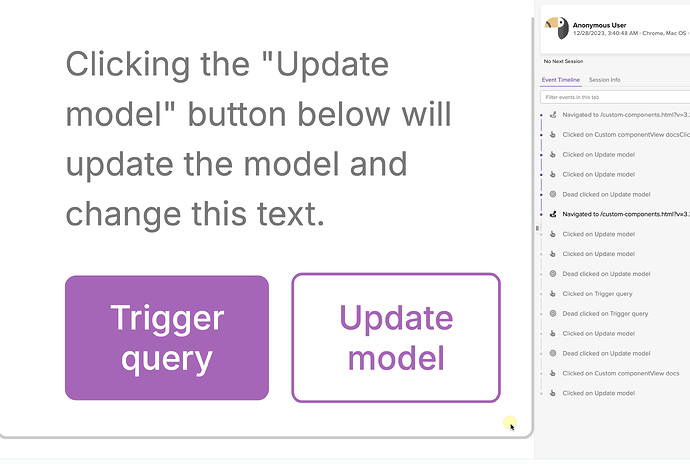
If you've tried to set up a session replay integration in Retool using LogRocket, OpenReplay, or any similar tool, you've probably hit a frustrating wall. Scripts injected at the app level fail silently, and the reason comes down to how Retool renders apps — inside a sandboxed iframe that blocks access to cookies, session storage, and cross-origin globals. This guide explains why the standard approach breaks and walks you through the one method that actually works.
Why Session Replay Tools Don't Work in Retool by Default
Tools like LogRocket and OpenReplay rely on browser APIs — cookies for session identification, sessionStorage or localStorage for state, and access to the top-level window object to attach their SDK. Retool renders your app inside an iframe with the sandbox attribute set, which restricts all of these by default.
When you try to inject a monitoring script globally through Retool's app-level JavaScript settings, the script runs inside that sandboxed context and can't initialize properly. You won't always see a clear error — the SDK just silently fails to attach, and no sessions get recorded. This is a known limitation, and as of now, Retool does not offer a native first-party session replay feature, nor does it have an official third-party integration for tools like LogRocket.
The Workaround: Inject LogRocket via a Custom Component
The fix is to use a Retool Custom Component. Custom components render in their own iframe context with slightly different permissions, and critically, they allow you to include raw HTML and <script> tags directly in the component template. This is where you can successfully initialize a session replay SDK.
Here's how to do it step by step:
- Step 1: In your Retool app, add a new
Custom Componentfrom the component panel. Place it anywhere on the canvas — you can size it down to nearly invisible if you don't want it taking up UI space. - Step 2: Open the Custom Component editor. You'll see a default HTML template. Locate lines 111–112 (or simply the bottom of the
<body>section) and insert the following script tags:
<script src="https://cdn.intake-lr.com/LogRocket.min.js" crossorigin="anonymous"></script>
<script>window.LogRocket && window.LogRocket.init('your-app-id/your-project');</script>
- Step 3: Replace
'your-app-id/your-project'with your actual LogRocket application ID, found in your LogRocket project settings. - Step 4: Save the component and reload your Retool app. Open your LogRocket dashboard — you should start seeing sessions appear within a minute or two of user activity.
What This Captures (and What It Doesn't)
Because the LogRocket SDK is initialized inside the custom component's iframe, session capture is scoped to that iframe's context. In practice, LogRocket is still able to record DOM mutations, network requests, and console errors originating from within the Retool app — which covers the majority of debugging use cases. You'll be able to replay user sessions, see what components were interacted with, and identify JavaScript errors.
However, there are limitations to be aware of:
- User identity stitching (calling
LogRocket.identify()with your own user data) will need to be done inside the same custom component script block, since the SDK instance is scoped to that iframe. - If you're using Retool Workflows, this approach does not apply — Workflows are server-side and have no browser session to record.
- Cross-iframe network request capture may be incomplete depending on how your Retool queries are structured.
Is This the Right Approach for Customer-Facing Retool Apps?
Yes — this workaround is especially useful if you're building a customer-facing portal on Retool and need to understand how users navigate it, or quickly debug issues they report. Internal tooling teams often skip observability entirely because it feels hard to set up, but even partial session replay coverage is far better than flying blind when a stakeholder reports a broken workflow.
For teams with stricter compliance requirements, check LogRocket's data privacy settings to ensure PII scrubbing is configured before rolling this out to end users. LogRocket supports DOM element masking and network sanitization rules that you can set at the project level.
Will Retool Add Native Session Replay Support?
As of the time of writing, Retool has internal feature requests open for both a first-party session replay feature and an official third-party session replay integration (such as a native LogRocket connector). Neither is on the public roadmap. If this is important to your team, the best move is to submit feedback directly through Retool's community or support channels to register your interest — product prioritization responds to volume.
Until then, the custom component injection method is the most reliable path to getting session replay working in Retool today. It takes under ten minutes to set up and requires no backend changes — just a LogRocket account and a spare custom component slot in your app.
Ready to build?
We scope, design, and ship your Retool app — fast.