Guides
Retool Workflow Webhook URL Parameters: What You Need to Know
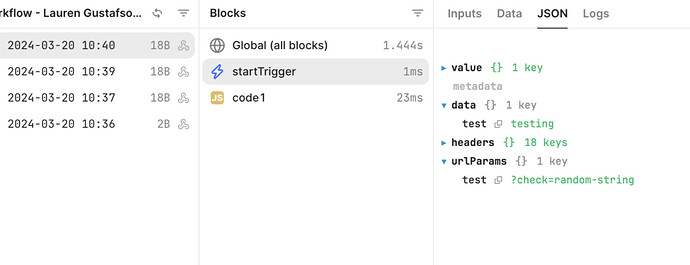
If you're trying to capture Retool Workflow webhook URL parameters — like a query string value passed as ?check=random-string — you've likely discovered that Retool doesn't support this out of the box. This is a known limitation that's blocking real-world integrations, most notably with services like Onfleet that use URL query parameters (not JSON bodies) to verify webhook endpoints during registration. Here's what's going on, what you can access today, and how to work around it.
Why URL Query Parameters Matter for Webhook Verification
Many third-party services — Onfleet being a common example — follow a webhook verification handshake pattern. When you register a webhook endpoint, the service sends an initial HTTP request with a random token appended as a URL query parameter, like ?check=abc123. Your endpoint must echo that value back in a 200 OK response to prove ownership. No JSON body, no headers — just the raw URL parameter.
This is a problem if your endpoint is a Retool Workflow webhook trigger, because Retool currently does not parse or expose URL query parameters to the workflow runtime. That means you can't read ?check=abc123 from within your workflow, and the verification handshake fails entirely.
What Retool Workflow Webhook Triggers Actually Expose
When a webhook fires and triggers a Retool Workflow, you have access to three objects on the startTrigger variable:
startTrigger.data— the parsed JSON body of the incoming requeststartTrigger.error— any error information associated with the triggerstartTrigger.metadata— limited metadata about the trigger event
None of these currently expose the raw URL query string or individual query parameters. Even startTrigger.metadata, which sounds like a likely candidate, does not contain URL parameter data. If you're hunting through all three and coming up empty, you're not missing something — the data simply isn't available in the workflow context yet.
Is This a Bug or a Missing Feature?
This is a missing feature, not a bug. Retool's engineering team is aware that URL parameter parsing in webhook triggers is blocking legitimate use cases. As of the time of writing, the feature has been scoped out for development, but no public release date has been confirmed. The original community thread has accumulated significant interest from users integrating Onfleet, and other webhook-verification-style services.
Workarounds for Retool Webhook URL Parameter Parsing
Until Retool ships native URL parameter support in Workflow webhook triggers, here are the most practical options available right now:
- Use a middleware proxy: Stand up a lightweight serverless function (AWS Lambda, Cloudflare Workers, or a Vercel edge function) that receives the webhook, extracts the URL query parameter, and re-forwards the request to Retool as a JSON body. Your Retool Workflow can then read the value from
startTrigger.dataas normal. - Use a dedicated webhook relay service: Tools like Pipedream or Make (formerly Integromat) can receive the raw webhook, parse the URL parameter, and pass the transformed payload on to your Retool Workflow via a second HTTP call. This adds a hop but requires no custom code.
- Complete the handshake outside Retool: For one-time webhook registration flows like Onfleet's, consider completing the verification step using a temporary endpoint (e.g., a free Pipedream or RequestBin URL), then switching the webhook destination to your Retool Workflow URL once verification is done. This only works if the service doesn't re-verify on every request.
- Check if the service supports an alternative verification method: Some platforms offer multiple ways to verify webhook ownership — static tokens in headers, HMAC signatures in the body, or manual verification flows in their dashboard. Review the third-party service's docs before assuming the URL parameter approach is the only path.
How to Set Up a Simple Proxy Workaround (Lambda Example)
If you go the proxy route, the logic is straightforward. A minimal AWS Lambda function acting as your webhook receiver would:
- Parse the incoming request's query string to extract the parameter (e.g.,
check) - If the
checkparameter is present, respond immediately with a200and the string value — completing the handshake without ever hitting Retool - If no
checkparameter is present (i.e., it's a real event), forward the request body as JSON to your Retool Workflow webhook URL using an HTTP POST
This way, your Retool Workflow only ever receives well-formed JSON event payloads, and the one-time verification handshake is handled transparently at the proxy layer.
What to Watch For When Retool Ships This Feature
When Retool does add URL parameter parsing to Workflow webhook triggers, expect the query string values to be accessible somewhere under the startTrigger object — likely as startTrigger.metadata.queryParams or a new top-level key like startTrigger.queryParams. Watch the Retool changelog and the community thread for the official announcement.
Bottom Line
Retool Workflow webhook triggers do not currently support reading URL query parameters like ?check=random-string. The feature is on the engineering team's radar, but has no confirmed ship date. In the meantime, a lightweight proxy — whether a serverless function or a no-code relay tool — is the most reliable workaround to unblock webhook verification flows with services like Onfleet. Keep an eye on the Retool community and changelog for updates.
Ready to build?
We scope, design, and ship your Retool app — fast.