Guides
Retool "Unable to Verify the First Certificate" SSL Fix
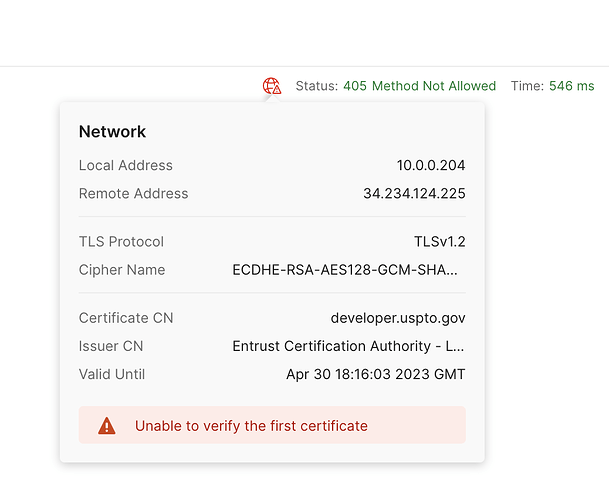
If you're seeing an error like request to https://your-api.com failed, reason: unable to verify the first certificate when making external API calls from Retool, this guide is for you. This SSL certificate verification error is one of the most common issues teams hit when connecting Retool to third-party REST APIs — including services like DocuSign, USPTO, and custom-hosted backends. The fix isn't always obvious, especially because the same request often works fine in a browser or curl while failing intermittently inside Retool.
What Does "Unable to Verify the First Certificate" Actually Mean?
This error means Retool's backend cannot validate the SSL certificate chain presented by the external API server. It's not a problem with your query logic or authentication — it's a trust issue at the TLS handshake level. Specifically, one of the following is usually true:
- The API server is using a certificate signed by a private or intermediate CA that isn't in Retool's trusted certificate store.
- The server is not sending the full certificate chain (i.e., intermediate certificates are missing).
- The certificate was issued by a public CA but the chain isn't properly configured on the server side.
The reason it works in your browser is that browsers maintain their own, more permissive trust stores and often cache intermediate certificates. Postman replicates this behavior by default — but if you disable SSL Certificate Verification in Postman and the request succeeds, that's a strong signal that the server's certificate chain is incomplete or untrusted.
Why This Happens Intermittently in Retool
Several users in the Retool community have noted that this error doesn't happen on every request — it appears intermittently, sometimes more frequently at specific times of day. This pattern usually points to a load balancer or CDN on the API provider's side that rotates between servers, some of which have a misconfigured or incomplete certificate chain. You're not doing anything wrong; you're just occasionally hitting the bad node.
Retool Cloud: What You Can (and Can't) Do
If you're on Retool Cloud, your options are limited by design. Retool's cloud environment does not allow you to:
- Disable SSL certificate verification globally or per-resource
- Upload custom or private CA certificates for REST resource types
This is a deliberate security constraint. If you're hitting a public API (like DocuSign or USPTO) that has a legitimate but incomplete certificate chain, your best path forward is to contact the API provider and report that their server is not sending the full chain. This is actually a misconfiguration on their end, not Retool's.
In the meantime, you can implement a retry strategy directly in your Retool query. Since the error is intermittent, a simple retry on failure often resolves it:
- Enable the
Run query on failureoption in your query settings, or - Use a
JavaScript queryto wrap your REST call in a try/catch with a loop that retries up to 3 times before surfacing the error to the user.
Retool Self-Hosted: How to Add Custom CA Certificates
If you're running Retool self-hosted, you have full control over the Node.js environment that executes your queries, which means you can inject custom CA certificates. Here's how to do it:
- Step 1: Obtain the PEM-formatted certificate file for your CA or the server's full certificate chain.
- Step 2: Mount the certificate file into your Retool container. In your
docker-compose.yml, add a volume mapping such as./certs/my-ca.pem:/usr/local/share/ca-certificates/my-ca.crt. - Step 3: Set the
NODE_EXTRA_CA_CERTSenvironment variable in your Retool service to point to the mounted certificate path:NODE_EXTRA_CA_CERTS=/usr/local/share/ca-certificates/my-ca.crt. - Step 4: Restart your Retool backend service. New REST API calls will now trust the custom CA when verifying the certificate chain.
This approach works for both private internal APIs with self-signed certificates and public APIs whose intermediate CA isn't included in the default Node.js trust store.
How to Confirm the Certificate Chain Is the Problem
Before spending time on configuration changes, confirm the root cause using openssl:
- Run
openssl s_client -connect your-api-host.com:443 -showcertsfrom your terminal. - If you see
Verify return code: 21 (unable to verify the first certificate)or a chain depth of only 1 when you expect 2–3 certificates, the server is not sending its intermediate certificates. - If the chain looks complete but still fails in Retool, the root CA may simply not be in Node.js's bundled CA list — which the
NODE_EXTRA_CA_CERTSfix above resolves.
Summary: Quick Reference by Retool Deployment Type
- Retool Cloud + public API (e.g., DocuSign, USPTO): Report the incomplete chain to the API provider; implement query retries as a short-term workaround.
- Retool Cloud + private/internal API: Consider exposing the API through a properly chained public certificate, or migrate to self-hosted Retool.
- Retool Self-Hosted + any API: Use
NODE_EXTRA_CA_CERTSto inject your CA certificate into the Retool backend environment.
SSL certificate errors in Retool are almost always a solvable infrastructure problem rather than a code problem. Identify which deployment model you're on, confirm the certificate chain is actually incomplete using openssl, and apply the appropriate fix above. If you're on Retool Cloud and the API provider won't fix their chain, escalating to Retool support with specific endpoint details is your best next step — they can investigate whether the issue originates inside Retool's network layer.
Ready to build?
We scope, design, and ship your Retool app — fast.