Guides
Retool Table setFilters: The Complete How-To Guide
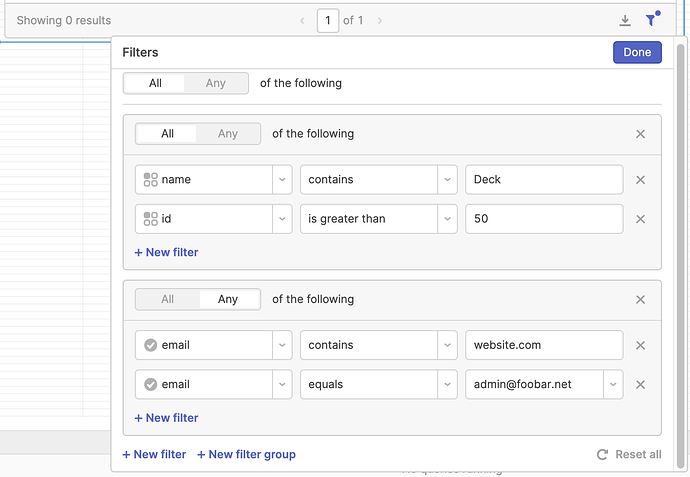
If you've been requerying your database every time a user changes a dropdown or search input in your Retool app, there's a better way. table.setFilters() is a Retool table method that lets you filter table data entirely on the client side — no new database query needed. It's roughly 3x faster in practice, and once you know the correct syntax, it's straightforward to implement. This guide covers everything: basic usage, multiple filters, clearing filters, filterStackType, and handling multi-select components.
What Is table.setFilters() in Retool?
The setFilters() method is called directly on a Retool table component. Instead of triggering a new API or database query when a user interacts with a filter control, you call setFilters() from a JavaScript query to apply filters against the data already loaded in the table. This makes filtering feel near-instant and reduces load on your backend.
One important caveat before you start: setFilters() is not reactive. You cannot bind it to a component's value in the table's properties panel and expect it to auto-update. You need to trigger it explicitly — typically from a JavaScript query that fires on the onChange event of your dropdown, text input, or other filter control.
Basic Syntax: How to Call setFilters()
Each filter is an object with three keys: columnName, filterValue, and operator. Note that the docs have historically used operation — the correct key is operator.
Here's the simplest example, filtering a table by a single column based on a dropdown's selected value:
columnName— the exact column name in your table datafilterValue— the value to filter by (always a string)operator— the comparison type (e.g."equals","contains","isEmpty","isNotEmpty")
Example — filter by a product type dropdown (selProductType) on a table named tblProducts:
tblProducts.setFilters([{ columnName: "product_type_id", filterValue: String(selProductType.value), operator: "equals" }])
Always cast filterValue to a string using String() if your column values are numbers or IDs.
How to Clear All Filters
To reset the table and remove all active filters, call setFilters() with an empty array:
tblProducts.setFilters([])
Filters applied via setFilters() appear in the table's filter UI (the filter icon). Calling setFilters() replaces any previously set filters entirely — it does not merge with existing ones by default.
How to Apply Multiple Filters Conditionally
In real apps, users often have several filter controls — a product type dropdown, a town selector, a name search field — and any of them might be empty. The right pattern is to build the filters array dynamically and only push a filter if the control has a value:
var filters = []
if (selProductType.value) { filters.push({ columnName: "product_type_id", filterValue: String(selProductType.value), operator: "equals" }) }
if (selTown.value) { filters.push({ columnName: "town_id", filterValue: String(selTown.value), operator: "equals" }) }
if (txtProductName.value) { filters.push({ columnName: "product_name", filterValue: txtProductName.value, operator: "contains" }) }
tblProducts.setFilters(filters)
This approach rebuilds the full filter array on every change, which also solves the problem of removing a filter when a user clears a control.
How to Add a Filter Without Losing Existing Ones
If you want to append a filter to whatever is already set rather than replacing everything, use the spread operator to merge the existing filters with the new one:
tblProducts.setFilters([...tblProducts.filters, { columnName: "id", operator: "equals", filterValue: "20" }])
Using filterStackType: AND vs OR Logic
By default, multiple filters are combined with AND logic. To use OR logic, pass "or" as the second argument to setFilters():
tblProducts.setFilters([{ columnName: "name", filterValue: "alice", operator: "contains" }, { columnName: "name", filterValue: "bob", operator: "contains" }], "or")
The second parameter accepts "and" or "or". If omitted, it defaults to "and".
How to Handle Multi-Select Components
Because filterValue only accepts a single string, you can't pass a multi-select array directly. Instead, loop over the selected values and push one filter object per value, then combine them with "or" logic:
var filters = []
if (ownerFilter.value.length > 0) { ownerFilter.value.forEach(f => { filters.push({ columnName: "customer_owner", filterValue: f, operator: "contains" }) }) }
customers.setFilters(filters, "or")
This is the correct pattern for any multi-select Retool component — one filter entry per selected value, joined with "or".
Checking for Empty or Non-Empty Values
To filter rows where a column is empty or not empty, use the "isEmpty" or "isNotEmpty" operators. Pass an empty string as the filterValue:
tblData.setFilters([{ columnName: "COUPON_PF", operator: "isNotEmpty", filterValue: "" }])
Note that "is empty" (with a space) does not work — the correct values are "isEmpty" and "isNotEmpty" (camelCase, no space).
Known Limitations of setFilters()
- Not reactive: Must be triggered by an event (e.g.
onChange), not bound declaratively. - No nested logic: You cannot currently express conditions like
type = X AND (name LIKE Y OR description LIKE Y). Complex grouped logic still requires a database query. - Single string filterValue: Multi-value filtering requires multiple filter objects, not arrays in a single object.
Despite these constraints, table.setFilters() is one of the most useful Retool table methods available. For any app where your table data is already loaded and users just need to slice it differently, client-side filtering with setFilters() is almost always the right call — faster for users, easier on your database, and cleaner to implement than re-running queries on every input change.
Ready to build?
We scope, design, and ship your Retool app — fast.