Guides
Retool Table Programmatic Row Grouping: What Works Now
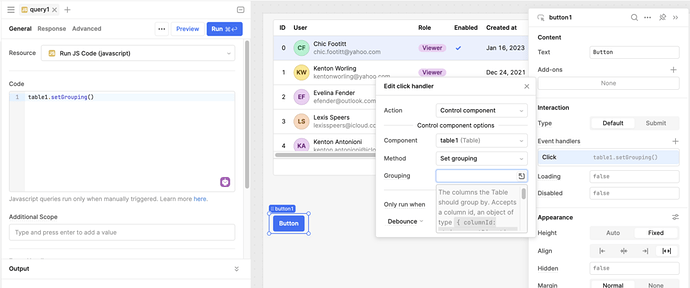
If you've landed here, you're probably trying to figure out how to control Retool table programmatic row grouping — letting users toggle column-based grouping on and off at runtime without rebuilding the whole app. The short answer: as of now, Retool does not natively support controlling table row grouping via JavaScript or component state. But there are solid workarounds, and this guide walks through the best ones.
Why Retool Doesn't Support Programmatic Row Grouping (Yet)
The Retool community thread on this topic has been a magnet for upvotes since it was first posted. Developers building internal tools want users to decide for themselves whether data is easier to read grouped by department, status, region, or not grouped at all. Retool's team acknowledged the gap and logged a feature request, but the capability hasn't shipped yet. Until it does, you need a workaround that feels seamless to your end users.
The Core Problem: One Table, Two Modes
The most common real-world scenario looks like this: you have a data table that makes sense grouped by a column (say, status or assigned_team) for some users, and makes more sense as a flat list for others. Retool's Table component lets you configure grouping at design time, but you can't flip it on or off programmatically based on user input. That forces you into workarounds.
Workaround 1: Two Tables, One Toggle (The Most Reliable Method)
This is the approach community member PadenM landed on, and it works well in production. The idea is simple: build two separate Table components — one with row grouping configured, one without — and show or hide them based on a user-controlled toggle.
- Add a
Segment controlorSwitchcomponent to your app. Label it something like Group by Status. - Create
table1with grouping enabled on the column you want (e.g.,status). - Create
table2as a flat, ungrouped version of the same data. - On
table1, set the Hidden property to{{ segmentControl1.value !== 'Grouped' }}. - On
table2, set the Hidden property to{{ segmentControl1.value !== 'Flat' }}. - Both tables should reference the same query — for example,
{{ getOrders.data }}— so you're not duplicating data sources.
This approach is straightforward, easy to maintain, and gives users a clean toggle experience. The main cost is a bit of duplication in your canvas, but for most internal tools, that's a reasonable trade-off.
Workaround 2: Transform Your Data Before It Hits the Table
If you want a single table and are comfortable pre-processing data, you can simulate grouping by sorting and injecting visual separator rows using a JavaScript query or a transformer. Here's the pattern:
- Create a
Switchcomponent calledtoggleGrouping. - Write a transformer that checks
{{ toggleGrouping.value }}and either returns the raw data or a version sorted (and optionally annotated) by your grouping column. - Use conditional row styling in the
Tablecomponent to visually distinguish group header rows from data rows using the Row color property.
For example, your transformer might look like:
const data = getOrders.data; if (!toggleGrouping.value) return data; return [...data].sort((a, b) => a.status.localeCompare(b.status));
This won't replicate Retool's native collapsible group rows, but it gives users a visually organized flat table that behaves consistently.
Workaround 3: Use a State Variable to Drive Column Visibility and Sorting
For more advanced use cases, pair a state variable with dynamic column configuration. Store the user's grouping preference in groupingState, then write query logic or transformers that respond to it. While you still can't toggle native grouping, you can change sort order, hide/show columns, or restructure output data to match what grouped data would look like.
What to Watch For When Retool Ships Native Support
When Retool does release programmatic grouping control (and given the community demand, it's a matter of when, not if), expect it to look something like a groupedColumns property on the Table component that accepts a dynamic array. You'd wire it directly to a multiselect or toggle, like: {{ multiSelect1.value }}. Keep an eye on the Retool changelog and community release notes.
Which Workaround Should You Use?
- Two tables + segment control — best for most teams. Simple, reliable, easy for non-technical teammates to maintain.
- Transformer-based sort — best if you want a single table and don't need collapsible groups.
- State variable approach — best for complex apps where grouping is one of several dynamic display preferences.
Retool table programmatic row grouping is a gap the platform will eventually close. Until then, the two-table toggle pattern is your most maintainable path forward. It's not elegant, but it ships — and at 11pm when you need this working, that's what matters.
Ready to build?
We scope, design, and ship your Retool app — fast.