Guides
Retool Stacks: Flexbox Layout in Containers Explained
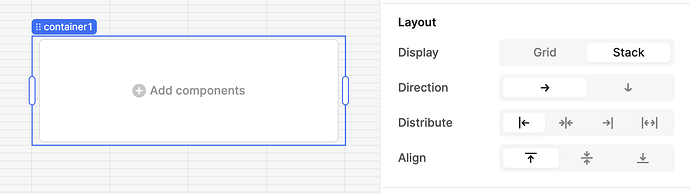
Retool Stacks are a new layout primitive that gives you flexbox-like control inside Container and Group components, going far beyond what Retool's default 12-column grid allows. If you're trying to build more precise layouts — think vertically expanding forms, sticky footers inside panels, or tightly aligned rows of components — the Retool Stacks flexbox layout container feature is exactly what you need. Here's everything you need to know to get started, avoid the known bugs, and work around current limitations.
What Are Retool Stacks and Why Do They Matter?
Retool's standard canvas uses a 12-column grid. It's flexible enough for most dashboards, but it breaks down when you need granular control — like pushing a form footer to the bottom of a Split Panel, or aligning a row of buttons without pixel-nudging. Stacks solve this by letting any Container or Group component behave like a CSS flexbox parent. Child components inside a Stack can be sized, spaced, and aligned the same way you'd think about a flex container in HTML and CSS.
How to Enable Stacks in Retool
Stacks are currently available on Retool Cloud and self-hosted v3.75 and above. Enabling them takes only a few clicks:
- Drop a
ContainerorGroupcomponent onto your canvas. - Select the component to open the inspector panel on the right.
- Navigate to the Layout section in the inspector.
- Find the Display property and set it to
Stack. - Your container now behaves as a flex parent — add child components and control their sizing and alignment directly.
Once a container is set to Stack, child components will expose additional width and height sizing options that don't appear in standard grid mode. This is where the real power lies.
What's Coming Next for Retool Stacks
The Stacks feature is still in beta, and the Retool team has published a roadmap of upcoming additions. If something feels missing, it's likely already planned:
- A flex-wrap equivalent so children can wrap to a new line instead of overflowing.
- Stack layout support on all frame types — sidebar, header, and main layout areas.
- Direct pixel-value sizing for component height and width.
- Ability to reorder Stack children via the component tree instead of only by dragging on the canvas.
Known Bugs and How to Work Around Them
Because Stacks are in beta, there are a handful of confirmed bugs worth knowing about before you build anything critical on top of this feature.
- Copy-paste doesn't add to the end of the Stack. When you copy and paste a component inside a Stack, the pasted component won't automatically join the Stack — you'll need to manually re-add it.
- Copy-paste loses height/width settings. Any custom sizing applied to a child component is dropped on paste. Re-apply your sizing after pasting.
- Drag-and-drop reordering is broken inside Stacks. If you're on Chrome and find that dragging components within a Stack (or out of a Stack) doesn't work, you're hitting a confirmed bug. The workaround: use a
Containercomponent with theStackdisplay setting, then reorder children via the component tree in the inspector panel instead of dragging on the canvas. - Stack appears empty after adding it (until page reload). Some users see error notifications immediately after adding a Stack, and the Stack appears blank in preview mode. A full page reload resolves the display issue — the Stack and its children are still saved correctly. This is a known UI bug and not a data loss issue.
Stack Layout in Container Headers and Footers
If you've tried setting a Container header or footer add-on to Stack display and noticed it doesn't actually behave like a Stack, you're not alone. This is currently expected behavior — Stack layout is not yet inherited by the header and footer slots of a Container component. The Retool team has an internal feature request open to support this.
The workaround: nest a new Container inside the header or footer slot, then set that inner container's Display property to Stack. It adds one extra layer, but it works reliably today.
Using Stacks Inside Split Panels and Forms
One high-value use case is getting a Form component (or any tall container) to expand 100% vertically inside a Split Panel and push its footer to the bottom while keeping inputs pinned to the top. Currently, Form components are not directly Stackable — you can't set their Display to Stack the same way you can with a plain Container. The workaround is to build your form layout manually inside a Container set to Stack, using Retool's native Form handling or a Form component nested inside the Stack container.
Should You Use Retool Stacks in Production Today?
Stacks are stable enough to experiment with and build non-critical layouts, but treat them as beta software. The core functionality — flexbox-style alignment and sizing inside a Container — works well. The bugs around drag-and-drop and copy-paste are annoying but have solid workarounds. If you're building a layout that genuinely needs more than the 12-column grid offers, Stacks are worth adopting now. Just avoid copy-paste-heavy workflows until the bug is patched, and lean on the component tree for reordering instead of canvas dragging.
Have a bug or edge case not covered here? The Retool team is actively collecting feedback — you can post in the Retool Community thread or reach out directly to the Stacks team to report issues and get updates on fixes.
Ready to build?
We scope, design, and ship your Retool app — fast.