Tutorials
How to Run a Query on Tab Change in Retool
If you've ever tried to run a query on tab change in Retool, you've probably hit the same wall: the tabbed container doesn't fire an event the way a button or form does. Running all your queries upfront works, but it's expensive. Wiring up the disabled property feels fragile. This post walks you through every viable method — from the cleanest modern approach to the workarounds that kept teams unblocked before Retool added native support.
The Best Approach: Use the Tabbed Container Event Handler
Retool now supports event handlers directly on the Tabbed Container component. This is the cleanest solution and the one you should reach for first. Here's how to set it up:
- Select your
Tabbed Containercomponent on the canvas. - Open the Inspect panel on the right and scroll to the Event Handlers section.
- Click + Add event handler and set the event to Tab change.
- Set the action to Trigger query and select the query you want to run.
- Optionally, add an Only run when condition — for example,
{{tabbedContainer1.selectedTabIndex === 2}}— to fire only on a specific tab.
That's it. The query fires every time the user switches tabs, and you can scope it to individual tabs with the condition field. No hacks required.
Why You Might Still Need a Workaround
If you're on an older Retool version, working in an embedded app with limited component options, or need more complex conditional logic across multiple tabs, the native event handler may not be enough on its own. The two approaches below were the community standard before event handlers landed — and they still have valid use cases today.
Workaround 1: Query JSON with SQL That Watches selectedTab
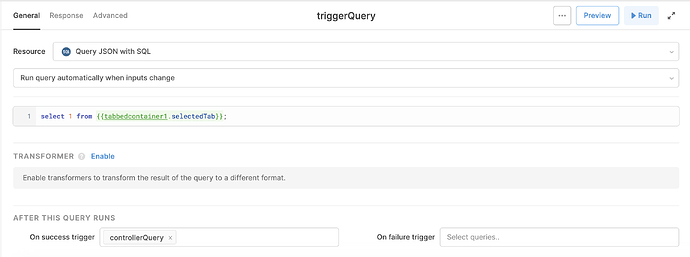
This is the approach Retool's own team recommended before event handlers existed. It uses a Query JSON with SQL query as a router that watches selectedTab as an input and chains into a JS query.
- Create a Query JSON with SQL query. In its input, reference
{{tabbedContainer1.selectedTabIndex}}so the query treats the selected tab as a watched dependency. - Set the query to run automatically when inputs change.
- In the onSuccess handler, trigger a JS Code query.
- Inside the JS query, use a
switchstatement orif/elseblock to conditionally trigger the correct fetch query for each tab:
switch (tabbedContainer1.selectedTabIndex) {
case 0: query1.trigger(); break;
case 1: query2.trigger(); break;
case 2: query3.trigger(); break;
}
This gives you fine-grained control and keeps heavy queries lazy — they only run when the user actually visits that tab.
Workaround 2: Use the Disabled Property as a Trigger Gate
For simpler cases where you just need a single query to run when a specific tab is active, you can use the disabled field on a query that's set to run automatically when inputs change.
- Set your query to Run query automatically when inputs change.
- In the Disable query field, enter a condition like:
{{tabbedContainer1.selectedTabIndex !== 1}}
This works because Retool treats the disabled expression itself as a watched input. When selectedTabIndex flips to 1, the condition re-evaluates, the query is no longer disabled, and it fires automatically.
The downside is that this approach gets messy fast. If you also need to trigger the same query from a button, or prevent re-fetching when the data hasn't changed, you'll quickly find yourself stacking conditions like {{query.data != null || tabbedContainer1.selectedTabIndex !== 1}}. It works, but it's hard to maintain.
What About selectedTabIndex Being Removed?
Some users have reported that selectedTabIndex no longer appears on newer tabbed container components. If you're not seeing it, check whether your component exposes selectedTab (by tab name or key) instead. The logic is identical — just substitute the property name in your expressions. The native event handler approach avoids this issue entirely since it doesn't rely on polling a property.
Which Approach Should You Use?
- Use the event handler if you're on a current version of Retool and need a clean, maintainable setup.
- Use the Query JSON router + JS switch if you need complex multi-tab logic, chained queries, or you're on an older version.
- Use the disabled property trick only for very simple, single-query cases where a button trigger isn't needed.
The core problem these methods solve is lazy loading tab data — you don't want to hammer your database with queries for every tab on page load. Whichever approach fits your setup, the goal is the same: run the right query at the right time, only when the user actually needs that data.
Ready to build?
We scope, design, and ship your Retool app — fast.