Tutorials
How to Run a Query on an Expanded Row in Retool
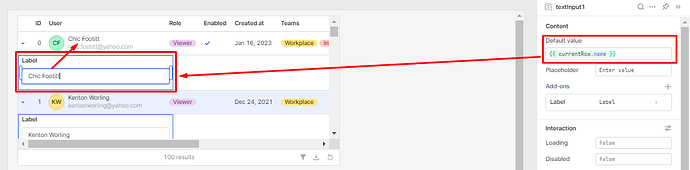
If you've ever tried to run a query on an expanded row in Retool, you've probably hit the same wall: currentRow doesn't behave the way you'd expect when you try to use it as a dynamic input for a child query inside an expandable row. This is a well-documented frustration in the Retool community, and there are a few reliable patterns that solve it — depending on your use case. Let's break them all down.
Why currentRow Doesn't Work the Way You Expect in Nested Queries
When you expand a row in a Retool table, the currentRow variable is available within the scope of components nested directly inside that expanded row. The problem arises when you try to use currentRow to trigger a query — for example, fetching all purchases for a given product ID when a product row is expanded. Retool's reactive dependency graph doesn't support calling .trigger() from inside a component's data source field. If you've tried something like this inside a data source field:
{{ Promise.resolve(query1.trigger({ additionalScope: { id: currentRow.id } })) }}
...you'll get an error like query1.trigger() is not a function. That's because .trigger(), Promises, and other imperative logic cannot live inside {{}} expressions used as data sources. Those fields expect self-evaluating, single-expression JavaScript — not side-effect-triggering code. Here's how to actually solve this.
Option 1: Pre-Join the Data in Your Outer Query (Most Reliable)
This is the most robust solution and works well when you control your data layer. Instead of fetching nested data on row expansion, include the nested data inside the outer table's query result — then access it via currentSourceRow in the expanded row.
- In your SQL query (e.g., Postgres), use
json_agg()or a subquery to nest child records as a JSON array in a column — for example,inner_json_tab. - Hide that column in the outer Retool table using column visibility settings.
- In your inner (nested) table's data source, set it to
{{ currentSourceRow.inner_json_tab }}.
This approach is clean, predictable, and avoids any scope issues. Each expanded row independently reads its own pre-loaded data. The downside is that it loads all nested data upfront, which may not be ideal for large datasets.
Option 2: Filter a Preloaded Query Using currentRow
If you don't want to restructure your SQL, you can load all the child data in a single query upfront and filter it client-side using currentRow inside the nested table's data source.
- Run a query (e.g.,
getAllPurchases) that loads all child records on page load. - In the nested table's data source, filter the results:
{{ getAllPurchases.data.filter(row => row.product_id === currentRow.id) }}
This works well for moderate-sized datasets. Since the filter runs client-side using currentRow — which is in scope within the nested component — each expanded row will correctly show only its own related records.
Option 3: Trigger a Query from an Event Handler Inside the Expanded Row
If you truly need to fire a fresh query per expanded row (e.g., the dataset is too large to preload), you can trigger a JavaScript query from within the expanded row's component event handler. Because the event fires from inside the expanded row, currentRow is in scope at trigger time.
- Add a component inside the expanded row (e.g., a Button or use the table's row expand event).
- In its event handler, call a JavaScript query that uses
additionalScopeto pass in the row context:
query1.trigger({ additionalScope: { productId: currentRow.id } })
- Inside
query1, reference{{ productId }}as you would any variable.
Important caveat: This approach breaks down if multiple rows are expanded simultaneously. Because the query result is global, every nested component reading from query1.data will display the result of the last triggered run — not the one scoped to their own row. If your UI only ever has one expanded row at a time, this is acceptable. Otherwise, stick with Options 1 or 2.
What NOT to Do: Triggering Queries Inside Data Source Fields
To save you time debugging, here's a clear list of things that will not work as a nested table's data source:
{{ query1.trigger({ additionalScope: { id: currentRow.id } }) }}—.trigger()is not allowed here.{{ Promise.resolve(query1.trigger(...)) }}— Promises are not supported in data source expressions.- Any multi-line JavaScript or code with side effects inside
{{}}— these fields are for evaluation only, not execution.
The linter in Retool may also warn you that currentRow is not defined when referenced in certain standalone components — this is a false positive. It will be defined at runtime when triggered from within the table's expanded row scope.
Quick Reference: Choosing the Right Approach
- Full control over SQL + want clean code? → Use Option 1 (pre-join with
currentSourceRow). - Moderate data size, no SQL changes? → Use Option 2 (client-side filter with
currentRow). - Need fresh query per row + only one row expanded at a time? → Use Option 3 (
additionalScopevia event handler).
Expandable rows with dynamic child queries are one of the trickier patterns in Retool, but once you understand how currentRow scope works — and where .trigger() is and isn't valid — the solutions are straightforward. When in doubt, pre-joining your data at the query level is the most predictable path to a working drill-down table.
Ready to build?
We scope, design, and ship your Retool app — fast.