Guides
How to Restrict Access by Environment in Retool
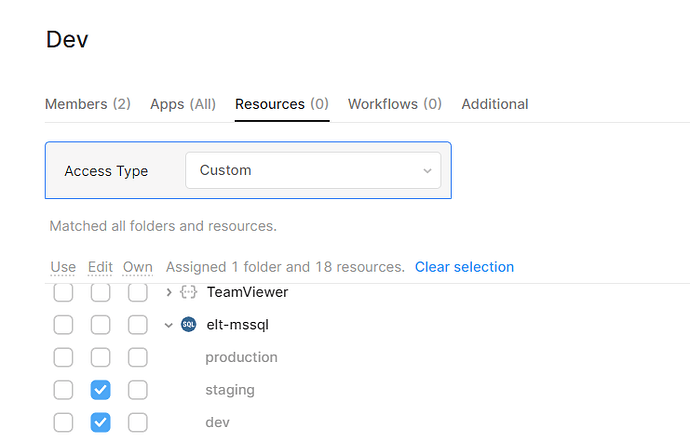
If you're trying to restrict access by environment in Retool — for example, keeping junior developers scoped to a staging environment while protecting production API keys — you've hit one of the platform's most-requested limitations. As of now, Retool does not natively support assigning permission groups to specific environments, meaning you can't simply say "this user group can only access the staging environment." Here's everything you need to know about the current state, what Retool has said about it, and what you can do today to work around it.
What Is the Problem with Retool Environment Access Controls?
Retool supports multiple environments (typically production, staging, and development) and allows you to define separate resource credentials for each. This is great for keeping your production database credentials separate from development ones — but only if you can control who can switch between environments.
The core issue: any developer with access to a Retool app can switch the environment toggle and potentially view or query against production resources. If your production environment has sensitive API keys or database connections configured, those are reachable by anyone who can open the app. For organizations that need to follow a least-privilege or least-knowledge security model, this is a hard blocker.
What Retool's Docs Say vs. Reality
You may have seen documentation or forum responses suggesting that Retool supports "access per environment and at the query level." This is partially true — Retool does let you restrict which queries and resources specific permission groups can use. However, restricting a permission group to only one environment (e.g., preventing a user from ever switching to production) is not a supported feature on the cloud plan as of this writing.
A Retool engineer confirmed in the official community forum that environment-based access controls tied to permission groups are on the roadmap, driven by numerous user requests. The team noted the feature was temporarily deprioritized while they focused on revamping Source Control, but it remains an active request.
Current Workarounds to Protect Production Secrets in Retool
While you wait for native support, here are the most practical approaches teams are using today:
- Separate Retool apps per environment: Create one Retool app that only connects to
stagingresources, and a separate app forproduction. Use Retool's permission groups to grant developers access only to the staging app. This is the most straightforward way to enforce environment isolation today. - Restrict resource access at the permission group level: In
Settings → Permission Groups, you can control which groups can use which resources. If your production API or database is defined as a separate resource from your staging one, you can deny access to the production resource for developer-tier groups entirely. - Use a proxy or gateway layer: Route all Retool queries through an internal API gateway that enforces environment-level auth. Developers get tokens scoped to staging; the gateway rejects production-scoped calls for unauthorized roles. This adds infrastructure overhead but gives you fine-grained control outside of Retool's permission model.
- Self-hosted Retool with custom configuration: If you're on a self-hosted plan, you have more flexibility to configure network-level restrictions — for example, ensuring that only certain IP ranges or service accounts can reach production credentials. This doesn't solve the UI toggle problem but limits blast radius.
- Audit query-level permissions: For sensitive operations, set individual queries to require explicit
resourceconfigurations that only work in one environment. Combined with careful naming conventions, this can reduce accidental cross-environment execution.
Step-by-Step: Isolating Developer Access Using Separate Apps
This is the most reliable workaround available right now. Here's how to implement it:
- Step 1: Define your staging resources separately from production in
Settings → Resources. For example, createMy API - StagingandMy API - Productionas two distinct resource entries with their respective credentials. - Step 2: Build your internal tool twice — or use Retool's
Source Controlfeature to maintain one codebase — but deploy two app instances: one wired to staging resources only, one to production. - Step 3: Create a
Developerspermission group inSettings → Permission Groups. Grant this group access only to the staging app and staging resources. Revoke access to all production resources for this group. - Step 4: Create a separate
OperatorsorAdminspermission group for users who need production access. Assign them to the production app. - Step 5: Periodically audit group memberships and resource permissions, especially when onboarding new developers.
How to Stay Updated on This Feature
Retool's roadmap for environment-based permission groups is not publicly dated, but the feature has been formally acknowledged by the engineering team. The best ways to track progress are:
- Watch the original community thread at
community.retool.comfor updates from the Retool team. - Submit a support ticket referencing this feature request so your use case is counted in their internal prioritization.
- Follow Retool's changelog and release notes for mentions of
permission groupsorenvironment access controls.
The Bottom Line
Natively restricting a Retool permission group to a single environment is not yet possible on cloud plans — but it's a known gap that Retool has committed to addressing. In the meantime, the most secure approach is to model environments as separate resources and separate apps, then gate access at the permission group level. It's more setup work, but it gives you the least-privilege security model your organization needs without waiting for the roadmap to ship.
Ready to build?
We scope, design, and ship your Retool app — fast.