Tutorials
How to Pass Data Between JavaScript Queries in Retool
If you've ever needed to pass data from one JavaScript query to another in Retool, you've probably run into additionalScope and wondered how it actually works. Triggering a query with .trigger() is well documented, but how the receiving query accesses those passed values is not immediately obvious — and the Retool community threads on this topic leave a lot of gaps. This guide walks you through exactly how to use additionalScope to pass data between JavaScript queries in Retool, step by step.
What Is additionalScope in Retool?
additionalScope is an optional parameter inside Retool's .trigger() function. It lets you pass a plain JavaScript object of key-value pairs to the query you're triggering. Once the triggered query runs, every key defined in that object becomes an accessible variable inside the receiving query's script — no imports, no declarations needed.
This is useful any time you want to reuse a generic query but feed it different inputs depending on context. Think of additionalScope as the argument list for a function call, where the triggered query is the function.
How to Trigger a Query and Pass Data with additionalScope
Here is the basic pattern for calling query1 from another JavaScript query and passing it a value:
query1.trigger({
  additionalScope: {
    userId: 42,
    partnerId: 'acme-corp',
  },
  onSuccess: function(data) {
    console.log('Query ran successfully!', data);
  }
});
In this example, query1 will receive two variables — userId and partnerId — that it can reference freely inside its script body.
How to Reference additionalScope Variables in the Receiving Query
This is where most builders get stuck. Inside query1 (the query being triggered), you reference the passed variables by their key name, directly, without any curly braces. Because query1 is already a JavaScript query, you write plain JS — not Retool's {{ }} template syntax.
So if you passed partnerId via additionalScope, you access it like this inside query1:
// Inside query1
console.log(partnerId); // logs 'acme-corp'

const result = await fetchDataForPartner(partnerId);
return result;
No var, no let, no const required for the variable itself — Retool injects it into the query's scope automatically when the query is triggered with additionalScope.
Why You Might See "Variable Is Not Defined" Errors
A common pain point: you add a variable name to additionalScope, try to reference it in the receiving query, and get a runtime error saying the variable isn't defined. Here are the most likely causes:
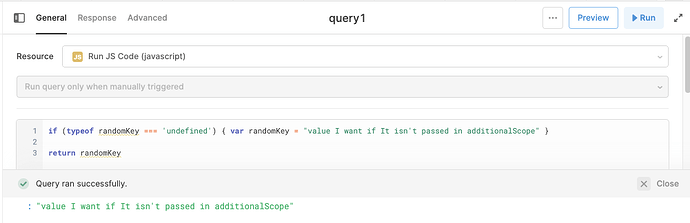
- You're running the query directly (not via trigger). If you hit "Run" on the query manually in the editor,
additionalScopevariables won't be injected — they only exist when the query is triggered via.trigger()from another query. Add a fallback or test via the calling query instead. - A component or query shares the same name. If you have a component named
partnerIdelsewhere in your app, Retool's JS scope can get confused. Rename either the component or theadditionalScopekey to something unambiguous. - Typo between caller and receiver. The key name in
additionalScopemust exactly match what you reference in the receiving query — including case.PartnerIDandpartnerIdare two different variables. - You're using curly braces. Wrapping the variable in
{{ }}inside a JS query won't work correctly. Drop the template syntax and reference the variable name directly.
Step-by-Step: Passing Data Between Two JS Queries in Retool
- Step 1: Create your receiving query — for example,
processOrder. Inside its script, reference the variables you plan to pass in, likeorderIdandcustomerId, as plain JS variables. - Step 2: In your calling query, invoke
processOrder.trigger()and pass values viaadditionalScope:processOrder.trigger({ additionalScope: { orderId: 1001, customerId: 'cust-77' } }) - Step 3: Run the calling query (not the receiving one directly). Retool will inject
orderIdandcustomerIdintoprocessOrder's scope at runtime. - Step 4: Use
onSuccessin the trigger call to handle the return value fromprocessOrderif needed.
Does additionalScope Work with Non-JS Queries?
Yes. additionalScope isn't limited to JavaScript queries. You can trigger a REST API query or a database query with additionalScope and reference the passed values using Retool's {{ }} syntax inside that query's configuration fields. The key difference is syntax: JS queries use plain variable names, while other query types use the template syntax.
Quick Reference
- Use
.trigger({ additionalScope: { key: value } })in the calling query - Reference passed keys by name (
key, not{{ key }}) inside JS receiving queries - Variables are only injected at trigger-time — manual runs in the editor won't have them
- Naming conflicts with components or other queries will cause unexpected behavior — keep names unique
onSuccessandonFailurecallbacks can be combined withadditionalScopein the same.trigger()call
Once you understand that additionalScope is essentially runtime scope injection — not a function argument in the traditional sense — passing data between JavaScript queries in Retool becomes intuitive. Use it to build reusable, composable query logic without duplicating code across your Retool apps.
Ready to build?
We scope, design, and ship your Retool app — fast.