Guides
Retool New Table Export as Displayed: What's Broken and How to Fix It
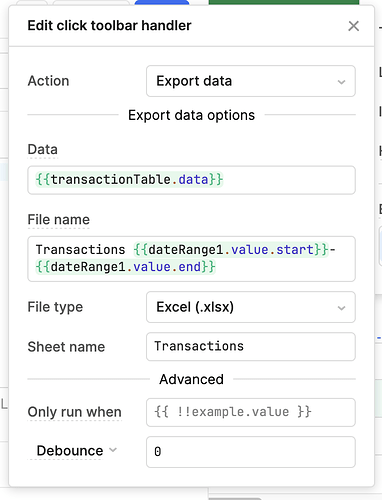
If you've tried to export data from Retool's new table component and noticed the output doesn't match what users see on screen, you're not imagining it. The retool new table export as displayed functionality is genuinely broken in several meaningful ways — missing mappers, wrong column headers, hidden columns leaking into the export, and datetime formatting that won't open cleanly in Excel. This has been an open issue in the Retool community for years, and while the team has acknowledged it, a native fix hasn't shipped yet. This post explains exactly what's broken and gives you working code to bridge the gap today.
What's Broken with Retool's New Table Export
In the legacy table, exporting what the user sees was straightforward. You could call table.displayedData and get exactly that — filtered rows, sorted order, mapped column values, renamed headers, and only the visible columns. The new table component introduced table.getDisplayedData() and table.exportData(), but neither replicates this behavior reliably.
Here's what getDisplayedData() currently gets wrong:
- Hidden columns are included by default, exposing data users were never meant to see in the export.
- Column headers don't match visual labels — if you've renamed a column in the UI, the export still uses the raw field key from your data source.
- Column mappers are not applied — transformed or computed cell values revert to their raw underlying values in the export.
- Datetime columns are not formatted — ISO strings like
2024-03-15T10:30:00Zare exported raw instead of in a human- or Excel-readable format. - Column ordering is not respected — if users have reordered columns or you've configured a custom order, the export ignores it.
The built-in table.exportData({ fileName: 'test', fileType: 'csv' }) method does apply some header mappings, but inconsistently — making it equally unreliable for production use.
Why This Matters for Internal Tools
Export functionality isn't a nice-to-have in internal tools — it's often how ops teams, finance, and support staff get data into Excel or Google Sheets to do their actual jobs. When an export silently includes hidden columns or strips out computed values, it erodes trust in the tool and creates downstream data errors. The old table handled this correctly. The new table, despite being the recommended component, regresses on this core capability.
The Best Community Workaround: A Working CSV Export Function
Community member bobthebear posted the most complete solution available. It uses getDisplayedData() with the includeHiddenColumns flag, handles arrays, numbers, booleans, and datetimes explicitly, and produces an RFC 4180-compliant CSV that opens correctly in Excel. Here's the full implementation you can drop into a Retool JS Query:
Call it like this at the top of your JS Query, replacing table2 with your table's component name:
formatTableAsSeen(table2, true, false);
The three arguments are: the table component reference, whether to include the header row (true/false), and whether to include hidden columns (true/false).
The full function handles the following cases correctly:
- Arrays — formatted as
["item1","item2"]so Excel doesn't split them across columns. - Numbers and booleans — passed through as-is without string coercion.
- Datetimes — ISO strings ending in
Zare converted toyyyy-mm-dd hh:mmformat, which Excel recognizes as a date/time and right-justifies accordingly. - Strings with special characters — quotes are escaped per RFC 4180 to prevent broken CSV rows.
- Hidden columns — controlled via the
includeHiddenColumnsparameter passed togetDisplayedData().
The function builds the CSV as a Blob, creates a temporary anchor element, and triggers a browser download — no server required. Here's the core invocation block:
const tableData = await tableComponent.getDisplayedData({ includeHiddenColumns: false });
What This Workaround Still Doesn't Fix
Be transparent with your team about the remaining gaps. Even with this workaround:
- Column header renaming is not reflected — the exported headers still use raw data keys unless you manually map them in the function before building the CSV.
- Column mappers (computed values) are not applied — if you've used Retool's column mapper feature to transform cell values, those transformations won't appear in the export. The raw source value is used instead.
- Column ordering depends on the order of keys returned by
getDisplayedData(), which may not match the visual column order the user sees.
These gaps exist because Retool's getDisplayedData() API doesn't expose mapper state, visual column order, or display-layer formatting. A proper fix requires Retool to update the method itself — something the team has acknowledged but not yet shipped.
How to Add This to Your Retool App
- Create a new JS Query in your Retool app (e.g. name it
exportTableAsDisplayed). - Paste the full
formatTableAsSeenfunction into the query editor. - At the top of the query, call
formatTableAsSeen(yourTableName, true, false);with your actual table component name. - Add a Button component to your canvas and set its onClick handler to trigger the JS Query.
- Test by clicking the button — a CSV file named
tableAsCSVfile.csvshould download automatically.
Waiting on a Native Fix from Retool
The Retool team has confirmed internally that exportData has issues with mappers and column formatting, and that includeHiddenColumns support is being tracked. If this is a blocker for your team, the most effective action is to add your voice to the original community thread. The more teams that surface this, the higher it climbs in the roadmap. In the meantime, the workaround above is the most robust option available — and for most standard table exports, it'll get your users what they need.
Ready to build?
We scope, design, and ship your Retool app — fast.