Guides
How to Build a Retool Multiple Pages App with Sidebar Nav
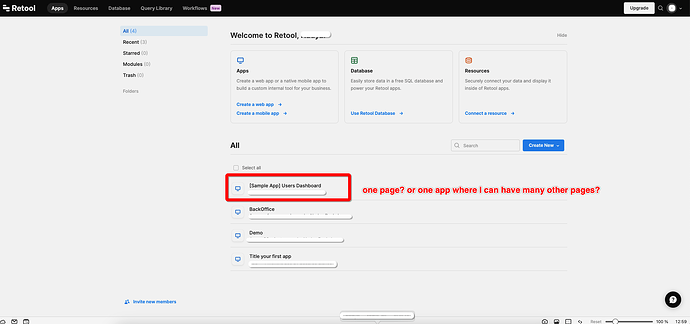
If you're trying to build a Retool multiple pages app with a sidebar that lets users click between views, you've probably hit the same wall everyone does: do you put every "page" inside one app, or split them into separate apps that share a navigation component? The answer depends on your app's complexity — and as of December 2024, Retool now has a native solution built in. Here's a full breakdown of every approach.
Why Building Multi-Page Apps in Retool Is Confusing
Retool's canvas-based editor makes it easy to build a single view fast, but the mental model for multi-page navigation isn't immediately obvious. You have a few architectural choices, each with real trade-offs around performance, maintainability, and scalability. Getting this wrong early means refactoring a lot of components later — so it's worth understanding the options before you build.
Option 1: Use Retool's Native Multiple Pages Feature (Recommended)
Since December 2024, Retool apps support multiple pages natively. This is now the default and recommended way to build multi-page apps inside a single Retool project. You no longer need to stitch together separate apps or rely on workarounds.
To set it up:
- Open your Retool app and navigate to the
Pagespanel in the left sidebar of the editor. - Click Add Page to create a new named page within the same app.
- Use a
Navigationcomponent or a custom sidebar to link between pages — Retool handles routing internally. - Each page has its own canvas, queries, and component tree, keeping things organized and performant.
This approach gives you the best of both worlds: a single app with isolated page logic and a shared navigation structure. Check the Retool Docs on configuring multiple pages for the full setup guide.
Option 2: Separate Apps with a Shared Navigation Module
Before native multipage support arrived, the most widely recommended pattern was to treat each "page" as its own Retool app, then share navigation using a Retool Module.
Here's how it works:
- Build your sidebar as a standalone
Module— a reusable component you can drop into any app. - Each section of your internal tool (e.g., Users, Orders, Analytics) becomes its own Retool app.
- Embed the sidebar
Modulein every app so navigation looks and behaves consistently. - Use the sidebar links to navigate between apps via Retool's
navigateTo()utility or direct app URLs.
This approach scales well for large, complex tools. Because each app loads independently, you avoid the performance hit of loading every page's queries and components at once. The downside: managing a shared module across many apps adds overhead when you need to update navigation.
Option 3: Tabbed Container with Visibility Toggling (For Simple Apps)
If your app is small and lean, you can keep everything in a single app and use a Tabbed Container or manually toggle hidden properties on frame components to simulate page switching.
This is the fastest approach to build but comes with serious caveats:
- All queries across every "page" load on app initialization — this gets slow fast.
- To mitigate this, implement a conditional query loader that checks
tabbedContainer.currentViewKeybefore running queries. Only fire queries relevant to the active tab. - Keep an eye on total component count — too many components in one app degrades the editor and runtime performance.
Use this only if your pages are genuinely lightweight and you need to ship something quickly. For anything that will grow, start with Option 1 or Option 2.
How to Choose the Right Approach
- Building something new today? Use Retool's native multiple pages feature. It's the most maintainable path forward.
- Have an existing app with many complex sections? Separate apps with a shared
Modulefor navigation is still a valid, battle-tested pattern. - Building a quick prototype or a genuinely simple tool? A
Tabbed Containerwith smart query loading will get you there fastest — just watch performance as it grows.
Key Things to Keep in Mind
Regardless of which approach you take, a few principles apply across the board:
- Never load all your data on app mount if only a subset is needed for the initial view. Use
triggerQuery()conditionally or set queries to manual trigger only. - When using modules for shared navigation, pin your module version so a navigation update doesn't accidentally break all consuming apps simultaneously.
- Use
navigateTo()withnewTab: falseto keep navigation seamless and avoid context loss when moving between app pages. - Name your pages and apps clearly — generic names like
App1orPage2become a maintenance nightmare as your tool scales.
Bottom Line
The cleanest way to build a Retool multiple pages app today is to use the native multipage support released in December 2024. It eliminates the stitching-together-apps problem that plagued Retool builders for years. If you're on an older setup using the separate-apps-plus-module pattern, it still works well — but migrating to native pages is worth the investment for long-term maintainability. Whatever you do, avoid cramming a complex tool into a single tabbed container without query load management; you'll feel the performance consequences immediately.
Ready to build?
We scope, design, and ship your Retool app — fast.