Guides
Retool Multipage App Page-Level Permissions: Workarounds That Work
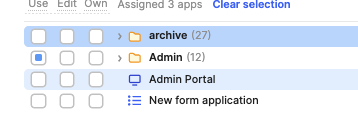
If you've migrated to a Retool multipage app and tried to lock down individual pages by user role, you've already hit the wall: Retool multipage app page-level permissions are not currently supported. Permissions can only be set at the application level, not per page. This is one of the most requested features from teams building role-based internal tools, and it's a real blocker for anyone trying to replace multiple single-page apps with a single unified multipage experience.
Why Page-Level Permissions Don't Exist in Retool Yet
Retool's multipage feature is relatively new, and permission granularity hasn't caught up with it yet. Right now, when you open the permissions panel on a multipage app, the controls apply to the entire application — not to individual pages within it. That means any user who has access to the app technically has access to every page URL inside it. There's no native way to redirect a user to a 403 page or a generic landing page if they navigate directly to a restricted page URL. Retool has confirmed this is on their roadmap and will be prioritized after the full release of the multipage feature.
The Real Problem This Creates for Teams
The most common pain point is code duplication. Before multipage apps, many teams handled role-based access by building separate apps for separate roles. That works, but it creates a maintenance nightmare — duplicated queries, duplicated UI components, and duplicated resources. Multipage apps were supposed to solve that. Without page-level permissions, teams are stuck choosing between code sprawl and a single app with no meaningful access control.
The Best Workaround Right Now: JS Query on Page Load
The most practical interim solution — recommended by Retool's own team — is to use a JavaScript query that fires on page load and checks the current user's group membership. If the user doesn't belong to the required group, the query redirects them to a safe landing page. Here's how to set it up:
- Step 1: On each restricted page, create a new JS query. Name it something clear like
checkPageAccess. - Step 2: In the query body, read the current user's groups using
current_user.groups. This is a built-in Retool variable that returns an array of group names the logged-in user belongs to. - Step 3: Write a conditional check. For example:
if (!current_user.groups.includes("admin")) { utils.openUrl("/app/your-app-name/home"); }— replacing"admin"with your required group name and the URL with your actual landing page. - Step 4: Set the query to run on page load by enabling the Run query on page load toggle in the query settings panel.
- Step 5: Repeat this for every page that requires access restrictions. Yes, it's manual — but it works reliably until native page permissions ship.
This approach is a workaround, not a permanent solution. It relies on client-side logic, which means a sufficiently determined user could theoretically bypass it. For truly sensitive data, always enforce access control at the resource or API level — not just in the UI.
How to Reduce Duplicate Code While You Wait
If you're managing multiple roles inside a single multipage app, two Retool features will save you the most time right now:
- Modules: Build shared UI components — like tables, forms, or headers — as reusable
modulesthat can be dropped into any page. Changes made to a module propagate everywhere it's used, eliminating the need to update the same component in five different places. - Query Library: Centralize your frequently used queries in Retool's
query library. Queries stored there can be called from any app or page, so you're not copy-pasting the same database calls across pages or apps.
Combining modules and the query library won't give you access control, but it will dramatically reduce the maintenance burden of your current multi-app or multipage setup while you wait for native page permissions.
How to Show or Hide UI Elements Based on Role
Another pattern worth using in the meantime is conditional visibility. Retool lets you set the hidden property of any component using a JavaScript expression. For example, to hide a table column or an entire container from non-admin users, you can set the hidden property to:
!current_user.groups.includes("admin")
This doesn't prevent URL-level access, but it does clean up the UI so users only see what's relevant to their role. Combined with the page-load redirect query described above, you get a reasonably solid access control layer using only what's available today.
What's Coming: Retool's Page Permissions Roadmap
Retool has publicly confirmed that page-level permissions are on the roadmap and will be prioritized after the multipage feature reaches full release. When it ships, you should expect the ability to assign permission groups to individual pages — the same way you currently assign them to entire apps — and have Retool enforce those restrictions server-side, including proper 403 handling for unauthorized direct URL access.
Until then, the checkPageAccess JS query pattern is your best bet. It's not pretty, but it's the approach Retool's own team recommends, and it gets the job done for most internal tool use cases where users aren't actively trying to circumvent access controls.
Bottom Line
Retool multipage app page-level permissions are a known gap with a confirmed fix coming. In the meantime: use a current_user.groups check in a JS query on page load to redirect unauthorized users, lean on modules and the query library to keep your code DRY, and use conditional hidden properties to clean up role-specific UI. It's not the native solution teams need, but it covers the gap well enough to ship.
Ready to build?
We scope, design, and ship your Retool app — fast.