Tutorials
Retool Key Value Map Component: How to Format Nested JSON Values
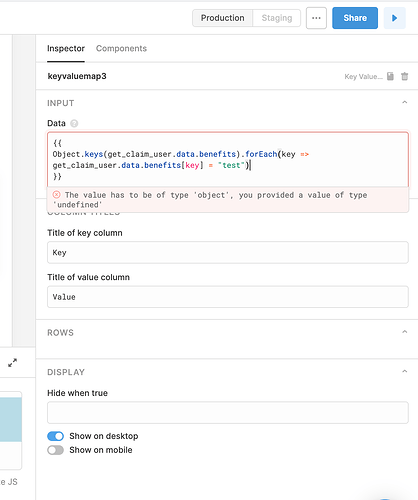
If you've tried to display nested JSON objects in a Retool Key Value Map component, you've probably hit this wall: you carefully format your data using JSON.stringify in a transformer, only to watch the Key Value Map throw all that indentation away and dump everything into one unreadable string. This guide explains why that happens and walks you through the approaches that actually work for Retool Key Value Map component formatting.
Why the Key Value Map Component Strips Your Formatting
The Key Value Map component in Retool is designed to render key-value pairs cleanly — but it doesn't treat pre-formatted strings (like those produced by JSON.stringify(value, null, 2)) as structured data. It sees the formatted string and renders it as plain text, collapsing whitespace in the process. So even if your transformer returns a beautifully indented JSON string, the component has no mechanism to preserve that indentation visually.
This is a particularly sharp pain point when your values are nested dictionaries — for example, Python dicts stored as JSONField in a database — that look something like this:
{"primary_key": {"key1": "value1", "key2": "value2"}}
At that nesting depth, raw output in the Key Value Map becomes nearly impossible to read without formatting help.
What Doesn't Work (So You Can Skip It)
- Attaching a transformer directly to a query: Running
JSON.stringifyinside a query-attached transformer and piping it to the Key Value Map does not preserve formatting. The component strips it. - Using a standalone transformer: Creating a separate transformer query (via the Transformers tab) and referencing it via
{{ transformer.data }}also does not preserve the visual formatting in the component. - Using
forEachin inline{{ }}syntax:Array.forEachreturnsundefined, not the mutated object. If you try to use it in Retool's implicit-return inline JS, you'll get eitherundefinedor a frustratingAn unexpected token has been founderror.
How Retool's Inline {{ }} JavaScript Actually Works
Before getting to solutions, it helps to understand the execution model. Retool's double-curly {{ }} syntax functions as an implicit return — whatever expression you write is evaluated and returned directly. This means you cannot declare variables with let or const, use multi-statement blocks, or rely on methods like forEach that return undefined. For anything more complex, you need a Run JS Code query, which supports full variable declarations and explicit return statements.
Two Approaches That Actually Work
Approach 1: Use a Run JS Code Query as Your Transformer
Instead of a transformer or inline JS, create a Run JS Code query in the Retool query editor. This gives you full JavaScript scope — variables, loops, and explicit returns. Here's an example:
var benefits = get_user.data.benefits;
var formatted = {};
Object.keys(benefits).forEach(function(key) {
formatted[key] = JSON.stringify(benefits[key], null, 2);
});
return formatted;
Then reference this query in your Key Value Map's Data field as {{ your_js_query.data }}. Because you're returning a proper object (not a formatted string), the component can render the keys and values. For values that are still complex objects, JSON.stringify at least gives you a consistent, predictable string representation.
Approach 2: Use Object.keys with .reduce() in Inline JS
If you want to stay in inline {{ }} without a separate query, use reduce instead of forEach — it returns a new object, which is exactly what the implicit-return model needs:
{{ Object.keys(get_user.data.benefits).reduce((acc, key) => { acc[key] = JSON.stringify(get_user.data.benefits[key], null, 2); return acc; }, {}) }}
This iterates over each key in your benefits object, applies JSON.stringify with indentation, and accumulates the results into a new object — all without needing a return statement at the top level. It works cleanly with Retool's implicit-return inline JS engine.
Step-by-Step: Setting Up the Key Value Map with Nested Data
- Step 1: Identify the query that returns your nested data (e.g.,
get_user) and confirm the shape ofget_user.data.benefitsin the query inspector. - Step 2: Choose your approach — Run JS Code query for complex logic, or inline
reducefor simpler cases. - Step 3: In your
Key Value Mapcomponent, open the Data field and reference your query or inline expression. - Step 4: Preview the component. If values are still nested objects, wrap them with
JSON.stringify(value, null, 2)to get a readable string representation. - Step 5: If you need true nested rendering (not just a string), consider using a
Tablecomponent or aTextcomponent with apre-formatted code block instead of the Key Value Map.
When to Ditch the Key Value Map Entirely
The Key Value Map component is great for flat data. For deeply nested structures, it's worth considering alternatives. A Text component set to render markdown, combined with a fenced code block, can display JSON.stringify output with monospace formatting that's far easier to read. A Table component with expanded row detail views is another strong option if you're already browsing query results in tabular form.
Summary
Retool's Key Value Map component doesn't natively preserve formatting from JSON.stringify — it renders values as plain strings. Your best paths forward are a Run JS Code query for full JS flexibility, or an inline Object.keys().reduce() expression that returns a properly shaped object. If readability of deeply nested JSON is the core requirement, a Text component with code formatting may serve your users better than the Key Value Map altogether.
Ready to build?
We scope, design, and ship your Retool app — fast.