Tutorials
How to Build a Retool Kanban Board (No Native Component Needed)
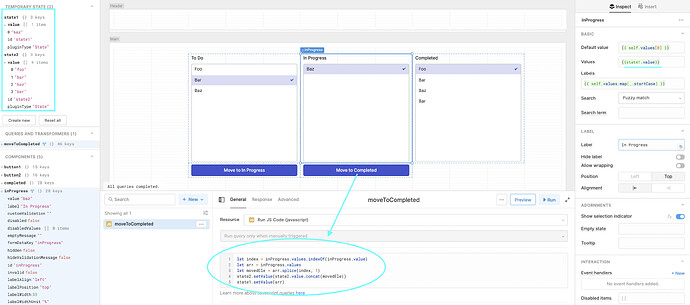
If you've been searching for a Retool kanban board, you've probably already noticed there's no native kanban component in the platform. It's one of the most-requested features in the Retool community — and it still isn't on the official roadmap. But that doesn't mean you're stuck. You can build a fully functional Trello-style kanban layout in Retool today using components that already exist, and wire it up to a Postgres database so that moving a card actually updates your data. This guide shows you exactly how.
Why Retool Doesn't Have a Native Kanban Component
Retool is built around a flexible component library, and while it covers a huge range of UI patterns, a drag-and-drop kanban board is one of the more complex interactions to support natively. The community has been asking for it since the early days of the platform, and the workarounds that exist — while not perfect — are more capable than they might look at first glance. For most internal tools (order tracking, deal pipelines, support ticket queues), the workaround approach is more than good enough.
The Core Building Blocks for a Retool Kanban Layout
Before writing a single line of JavaScript, you need to understand which Retool components you'll be combining. There are two solid approaches depending on how much customization you need:
- Listbox components — lightweight, fast, and easy to wire up. Best for simple kanban columns where each item is text-only.
- Listview components — more flexible. Use these when each card needs to display multiple fields, buttons, or conditional formatting.
- Temporary State — this is your in-memory store for each column's data. Each column (e.g.
state_todo,state_in_progress,state_done) gets its ownTemporary Stateobject. - JS Query — used to move items between columns and trigger any database writes.
- Modal or Form component — optional, but useful when you need to prompt the user for additional input before completing a card move.
How to Build a Kanban Board in Retool: Step-by-Step
Step 1: Set up your Temporary State objects. Create one Temporary State for each kanban column. If your board has three stages — To Do, In Progress, and Done — create state_todo, state_in_progress, and state_done. Initialize each with an empty array [].
Step 2: Load your data from Postgres. Write a SQL query that fetches all records and their current status column. Something like:
SELECT id, title, status FROM tasks ORDER BY updated_at DESC;
Then use a JS query on page load to distribute rows into the correct Temporary State based on their status value. Loop through the query results and call state_todo.setValue(), state_in_progress.setValue(), etc.
Step 3: Lay out your columns. Use a horizontal Container with three child Containers side-by-side — one per column. Inside each Container, drop in a Listbox or Listview and bind its data to the corresponding Temporary State. Label each column clearly.
Step 4: Add move buttons or triggers. The most reliable pattern for moving cards without native drag-and-drop is to add arrow buttons (→ and ←) either inside each list item (if using Listview) or beside the selected item in each Listbox. When clicked, the button fires a JS query that:
- Reads the selected item from the source column's
Temporary State - Removes it from the source array
- Appends it to the destination array
- Updates both
Temporary Statevalues - Runs a SQL
UPDATEquery to persist the new status to Postgres
Step 5: Surface a prompt on specific transitions. If moving a card to a particular column should ask the user for more info (e.g. a rejection reason when moving to "Blocked"), open a Modal before writing to the database. Collect the input inside the Modal's form, then fire the database write and state update only on confirmation. This keeps your data clean without complicating the main layout.
Connecting Your Kanban Board to Postgres
The SQL side of this is straightforward. Your UPDATE query should look something like:
UPDATE tasks SET status = {{ new_status.value }}, updated_at = NOW() WHERE id = {{ selected_task_id.value }};
Bind new_status to a Temporary State that holds the destination column name, and selected_task_id to whatever ID is currently selected in the source listbox or listview. Run this query inside your JS query after the state swap so the UI feels instant, with the DB write happening in the background.
Limitations to Know Before You Build
This approach works well for internal tools, but it has real tradeoffs compared to a native kanban component. There's no true drag-and-drop — users move cards via buttons or clicks. Styling each "card" to look polished takes extra work in Listview. And if your board has hundreds of cards, you'll want to think carefully about pagination or filtering so columns don't get unwieldy. For most internal use cases — order management, hiring pipelines, support queues — these limitations are entirely acceptable.
Should You Wait for a Native Retool Kanban Component?
Based on everything the Retool team has said publicly, a native kanban component is not currently on the roadmap. If your team needs this feature now, the workaround above is the practical path forward. It's fully functional, database-connected, and can be shipped in a day or two by any Retool developer who knows the platform. If you'd rather have an expert build it for you, that's exactly the kind of internal tool we build at our agency — reach out and we can scope it quickly.
Ready to build?
We scope, design, and ship your Retool app — fast.