Guides
Retool JavaScript Query in Query Library: Workarounds That Work
If you've tried to add a JavaScript query to Retool's Query Library and hit a dead end, you're not alone. This is one of the most requested missing features in the Retool community — and as of now, Retool does not natively support JavaScript queries in the Query Library. That means you can't share reusable JS logic across apps the same way you can share REST API or database queries. But there are real workarounds that teams are using in production, and this guide walks through each one so you can pick what fits your use case.
Why JavaScript Queries Aren't in the Query Library (Yet)
The Query Library in Retool is designed to centralize queries that can be reused across multiple apps — think shared database calls, API requests, and resource queries. JavaScript queries, however, are tightly scoped to the app they live in. They can reference component state, trigger other local queries, and interact with the app's context in ways that make centralization architecturally tricky. Retool has confirmed this is on their backlog, but there's no public ETA. That leaves developers with a few practical options to bridge the gap.
Workaround 1: Use Preloaded JavaScript for Pure Utility Functions
If your JavaScript query is a pure function — meaning it takes inputs and returns a result without needing to trigger other queries or read component state — then Preloaded JavaScript is your cleanest option. Retool allows you to define JavaScript that loads before your app runs, making those functions available globally across the app.
- Go to your app's settings and open the Preloaded JS section.
- Define your utility functions there (e.g., formatters, calculators, data transformers).
- Call them from any query or event handler in the app using their function name.
Limitation: Preloaded JS is per-app, not truly cross-app. You'd need to copy the code into each app's preloaded JS section. It's still better than duplicating logic inside individual queries, but it doesn't give you a single source of truth the way the Query Library would.
Workaround 2: Wrap Your JS Logic in a Retool Module
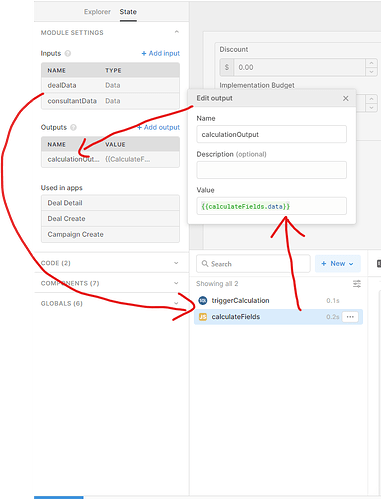
This is the most powerful workaround for teams building multiple apps that need to share complex JavaScript behavior. The approach, surfaced by the Retool community, works like this:
- Create a Retool Module dedicated to the shared JavaScript logic.
- Define module inputs for any data the JS query needs to operate on.
- Inside the module, create a
JavaScript querythat processes the input data. - Export
query.dataas a module output. - In your parent apps, add the module as a component and pass data in via inputs. Read the result from the module's output.
This gives you a single place to maintain the logic. When the JavaScript needs to change, you update the module once and every app that uses it gets the update. The trade-off is that triggering the module's internal query on demand from the parent app is not straightforward — Retool modules don't expose a clean "run this query now" API to the parent. You'll need to design around this, for example by using input changes to auto-trigger the module's query.
Workaround 3: Chain Queries Inside the Module
If your shared JavaScript query also needs to trigger other queries as part of its logic, those queries need to live inside the same module. This keeps everything self-contained. The module handles the full sequence — receiving inputs, running sub-queries, executing the JS transformation, and surfacing a final output. It's more setup upfront, but it gives you a genuinely modular, reusable unit of logic.
When None of These Work Well
The honest answer is that none of these workarounds are a perfect substitute. If your use case involves:
- A JavaScript query that must read live component state from the calling app
- Logic that needs to trigger app-level queries dynamically based on runtime conditions
- Actions duplicated across three or more apps that keep growing in complexity
...then you're hitting the real ceiling of what's possible today. The module approach reduces duplication but adds wiring overhead. Preloaded JS helps with pure logic but doesn't scale across apps. Until Retool ships native JavaScript query support in the Query Library, there's an unavoidable trade-off between maintainability and flexibility.
What to Do Right Now
Here's a practical decision tree to help you choose:
- Pure utility function, single app: Use
Preloaded JavaScript. - Pure utility function, multiple apps: Build a Retool Module with JS logic and share it across apps.
- Complex logic with sub-queries, multiple apps: Build a self-contained module where all queries are internal to the module.
- Logic that depends on live app state: Keep it in the app for now and document it carefully until Retool ships a better solution.
Add Your Voice to the Feature Request
Retool's product team is tracking demand for JavaScript queries in the Query Library through community upvotes and internal feedback. If this is a pain point for your team, the most useful thing you can do — beyond implementing a workaround — is add your use case to the original community thread. Concrete use cases with real business context move backlog items forward faster than generic +1s. Describe what you're building, why the current workarounds fall short, and what the impact is. That's the kind of signal that ships features.
Ready to build?
We scope, design, and ship your Retool app — fast.