Guides
Retool Infinite Loop of "Perform Changeset" Messages: Fix
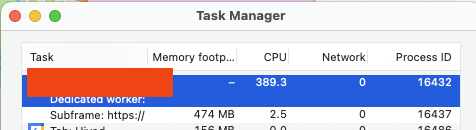
If your Retool app is suddenly frozen, running at a crawl, and flooding the browser console with Performance log: handling commit changeset messages, you've run into one of Retool's most disruptive platform-level bugs: the Retool infinite loop perform changeset issue. This isn't caused by anything you changed in your app — multiple teams across different organizations have hit it simultaneously, and it brings apps to a complete standstill in both edit and production modes.
What Does "Handling Commit Changeset" Actually Mean?
In Retool's internal architecture, a changeset represents a diff of state changes that need to be committed and propagated across your app's components and queries. Under normal conditions, these changesets are processed quickly and silently. When the loop occurs, Retool's state management engine gets stuck in a cycle — repeatedly trying to commit the same changeset without ever resolving it. The result is an endless stream of Performance log: handling commit changeset entries in your browser console, with your queries appearing to run continuously as functions that never complete.
What Are the Symptoms?
- Browser console is flooded with
Performance log: handling commit changesetlogs that never stop - The Retool app loads partially, then hangs or freezes entirely
- Queries appear in the console as functions that are constantly running
- CPU usage on the Retool browser tab spikes to very high levels
- The app is unusable in both edit mode and production mode
- Everything is slow, taking several minutes (if ever) to load
- No changes were made to the app — it broke on its own
Which Browsers Are Affected?
Community reports confirm that the infinite loop primarily impacts Chrome and Arc browsers. Users testing the same apps in Safari and Firefox did not experience the freeze or the console log spam. If you're in a pinch and need to keep working immediately, switching to Firefox or Safari is a viable short-term workaround while the underlying issue is being resolved. That said, this is a server-side or platform-level bug, so switching browsers only masks the symptom — it doesn't fix the root cause.
What Causes the Retool Perform Changeset Loop?
This bug is not caused by anything in your app's code, queries, or configuration. In the documented incident, none of the affected teams had made any edits to their apps in days or weeks before the issue appeared. The root cause is a bad platform-level deployment from Retool — a change to Retool's core runtime that introduces a regression in how changesets are processed and resolved. Because it's a platform push, it hits multiple organizations at the same time, which is why you'll often see several teams reporting it simultaneously in the Retool community forums.
How to Fix the Retool Infinite Changeset Loop
Since this is a platform-level issue, the fix is entirely on Retool's side. Here's what to do:
- Step 1: Confirm it's not isolated to your app. Open a different Retool app in your organization. If the same
handling commit changesetloop appears there too, it's platform-wide, not app-specific. - Step 2: Check the Retool community and status page. Visit
community.retool.comand the Retool status page to see if others are reporting the same issue. A cluster of reports appearing at the same time is a strong signal that a bad deploy is in progress. - Step 3: Use Firefox or Safari as a temporary workaround. If you need to keep working, these browsers appear resilient to this particular bug. Avoid Chrome and Arc until a fix is confirmed live.
- Step 4: File a support ticket with Retool immediately. Include your browser, Retool version (cloud or self-hosted), and a screenshot of the console logs. The more reports Retool receives, the faster they can prioritize a revert.
- Step 5: Wait for the revert. In the documented incident, Retool was able to identify the bad changeset, communicate internally, and push a revert relatively quickly. Once the revert is live, apps return to normal without any action needed on your end.
How to Verify the Fix Is Live
After Retool pushes a revert or patch, hard-refresh your app in Chrome (Cmd+Shift+R on Mac, Ctrl+Shift+R on Windows). Open the browser console and confirm that the Performance log: handling commit changeset messages are no longer streaming. Your queries should stop appearing as constantly-running functions, and the app should respond normally within a few seconds of loading. If the loop persists after a hard refresh, try clearing your browser cache entirely or testing in an incognito window to rule out any locally cached scripts.
How to Reduce Risk for Self-Hosted Retool
If your organization runs self-hosted Retool, you have one major advantage: you control your own upgrade cadence. To protect against bad platform deploys like this one, consider the following:
- Pin your Retool version in your
docker-compose.ymlor Helm chart and only upgrade after reading the release notes - Maintain a staging environment on the same version as production before rolling out updates
- Subscribe to Retool's release announcements and the community forum so you're alerted to regressions quickly
- Keep a rollback runbook ready — know exactly how to revert to a prior Docker image tag in under 15 minutes
The Bottom Line
The Retool infinite loop of perform changeset messages is a platform regression, not a bug in your app. It causes app freezes, browser CPU spikes, and continuous console log spam — most visibly in Chrome and Arc. The fix requires a revert from Retool's engineering team. Your job is to confirm the scope, switch to an unaffected browser if needed, report it to Retool support, and monitor for the revert. If you're on self-hosted Retool, use this as a prompt to lock down your upgrade and rollback processes so the next time a bad deploy ships, you can recover in minutes instead of waiting on a vendor.
Ready to build?
We scope, design, and ship your Retool app — fast.