Tutorials
Retool: Filter a Query by Dropdown Null Value (Select All Fix)
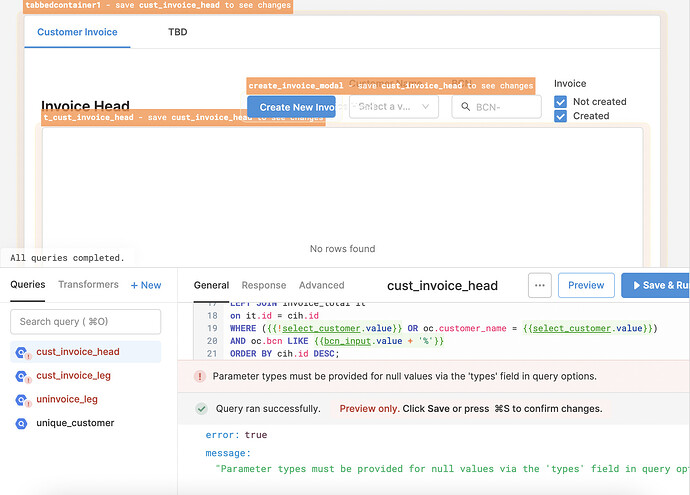
If you're trying to filter a Retool query by a dropdown (select) component and your table returns zero rows the moment the dropdown is empty, you're not alone. This is one of the most common head-scratchers in Retool — the null handler pattern shown in the official docs works inconsistently depending on your database and the SQL operator you're using. This guide explains exactly why it breaks and gives you a fix that actually works.
Why Your Null Handler Isn't Working
The typical pattern developers try first looks something like this in a SQL query:
WHERE {{ !selectComponent.value }} OR customer_name = {{ selectComponent.value }}
The intent is clear: if the dropdown has no value, skip the filter entirely; otherwise, apply it. The problem is that certain databases — BigQuery being a well-documented offender — do not handle null values gracefully when they're passed as bare parameters into a = comparison. Even wrapping the clause in parentheses doesn't resolve it:
WHERE ( {{ !selectComponent.value }} OR customer_name = {{ selectComponent.value }} )
Retool still passes null as a typed parameter to the database driver, and BigQuery (and sometimes others) will throw an error or silently return no rows. You may also see this error message in your query logs:
Parameter types must be provided for null values via the 'types' field in query options.
This is a BigQuery-level error. It means the database is refusing to infer the type of a null parameter — and there's no "types" field exposed in Retool's query UI to fix it from that side. The solution has to live in how you write your SQL.
The Fix: Use a Ternary Expression in Your WHERE Clause
The most reliable solution is to use Retool's JavaScript ternary syntax directly inside the WHERE clause. Instead of passing null to the database at all, you short-circuit the entire condition:
WHERE {{ select1.value ? "customer_name = '" + select1.value + "'" : "true" }}
Or, if you're using parameterized queries (recommended to prevent SQL injection), structure it like this:
WHERE {{ select1.value ? `customer_name = '${select1.value}'` : `1=1` }}
Here's what this does: when select1.value is null or an empty string (falsy), the entire expression evaluates to true (or 1=1), which matches every row. When the dropdown has a value, the real filter is applied. The database never receives a raw null parameter — it only ever sees a valid SQL fragment.
Why ILIKE Works When = Doesn't
If you're on PostgreSQL, you may notice that switching from = to ILIKE resolves the issue without needing the ternary. That's because ILIKE is more tolerant of null comparisons in how Retool's PostgreSQL driver handles parameter binding. However, this is not a universal fix — it won't help you on BigQuery or MySQL, and it introduces case-insensitive matching as a side effect. The ternary approach is safer and works across all databases.
How to Implement a "Select All" Pattern with a Dropdown
A common follow-up question is: how do you let users clear the dropdown to mean "show all records," rather than hiding the clear button entirely? Here are two clean approaches:
- Use the ternary fix above. A cleared dropdown (
nullvalue) naturally means "no filter applied" = all rows returned. This is the lowest-friction UX pattern. - Add a "Select All" option as a static value. In the dropdown's Options array, prepend an entry like
{ label: "All", value: "" }. Then in your SQL, treat an empty string as the "no filter" case — the ternary handles this automatically since""is also falsy in JavaScript. - Add a reset button. Place a Button component next to the dropdown, then in its click handler run a JS query that calls
select1.setValue(null)orselect1.clearValue(). This gives users an explicit "clear filter" action without relying on the dropdown's built-in clear button.
Step-by-Step: Apply the Fix in Your Retool Query
- Step 1: Open the query editor for the query that filters your table.
- Step 2: Locate your
WHEREclause. Remove any existing{{ !selectComponent.value }}null-handler pattern. - Step 3: Replace it with the ternary syntax:
WHERE {{ select1.value ? `customer_name = '${select1.value}'` : `1=1` }} - Step 4: If you have multiple filters (e.g., a text input and a dropdown), chain them with
AND, wrapping each in its own ternary:WHERE {{ input1.value ? `bcn = '${input1.value}'` : `1=1` }} AND {{ select1.value ? `customer_name = '${select1.value}'` : `1=1` }} - Step 5: Save and preview the query. Test with the dropdown empty, partially filled, and fully selected to confirm all three states return correct results.
Key Takeaways
The root cause of this bug is that databases like BigQuery don't accept untyped null parameters in SQL comparisons — and Retool's query runner doesn't expose a way to declare parameter types manually. The fix is to keep null out of the SQL entirely by using a JavaScript ternary inside your query template. This pattern is reliable, database-agnostic, and easy to extend when you have multiple optional filters. Once you adopt it as your default approach for optional dropdown filters in Retool, you'll never hit this bug again.
Ready to build?
We scope, design, and ship your Retool app — fast.