Tutorials
How to Use a Dynamic Table Name in a Retool SQL Query
If you've ever tried to use a dynamic table name in a Retool SQL query, you've probably run into a frustrating wall. You add a {{variable}} where the table name should go, and instead of a table, Retool wraps your value in quotes and turns it into a string — breaking the query entirely. This is a common pain point, especially when you have dozens of queries all pointing at the same table and need to switch it from a single place. Here's exactly what's happening and how to fix it.
Why You Can't Just Drop a Variable Into a Table Name
By default, Retool converts all SQL queries into prepared statements. This is a security feature — it prevents malicious input like DROP TABLE from being injected through user-facing fields. The trade-off is that prepared statements only allow dynamic values (like filter inputs or form data), not dynamic structural elements like table names, column names, or SQL functions. When Retool sees SELECT * FROM {{my_table_name}}, it parameterizes {{my_table_name}} as a string literal, which is why you end up with invalid SQL.
Option 1: Disable Prepared Statements on the Resource
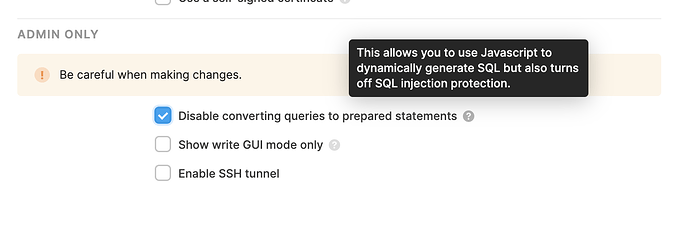
The most direct fix is to turn off prepared statements on your database resource. This lets Retool interpolate variables directly into the raw SQL string, so {{table_name_variable.value}} in a FROM clause will work exactly as you'd expect.
- Go to the Resources page in Retool and open your database resource.
- Find the Disable prepared statements toggle and enable it.
- Save the resource and re-test your queries.
Important caveat: disabling prepared statements is a global setting — it applies to every query using that resource. This widens your SQL injection surface area significantly. A safer approach is to duplicate the resource and disable prepared statements only on the copy. Use the copy exclusively for queries that need dynamic structural elements, and keep the original locked down for everything else. This limits the blast radius if something goes wrong.
Option 2: Use BigQuery's EXECUTE IMMEDIATE (No Settings Change Required)
If you're running BigQuery and don't want to touch your resource settings at all, there's a clean workaround using BigQuery's native EXECUTE IMMEDIATE with a DECLARE and SET block. This approach was shared by community member bshah and works without disabling prepared statements:
- Declare a string variable inside the SQL itself using
DECLARE. - Assign it the value from your Retool variable using
SET— this part is parameterized safely. - Use
EXECUTE IMMEDIATEwithformat()to inject the table name string into the query dynamically at the BigQuery execution layer.
Here's the full pattern:
DECLARE table_name STRING;
SET table_name = {{text1.value}};
EXECUTE IMMEDIATE format("""
SELECT col_1, col_2
FROM `your_dataset`.%s
""", table_name);
The SET line handles the Retool variable safely as a parameterized value. BigQuery then uses that value inside EXECUTE IMMEDIATE to construct and run the final SQL. Because the dynamic table name substitution happens entirely inside BigQuery — not in Retool's query layer — prepared statements remain enabled and your security posture stays intact.
Option 3: Store the Table Name in a Temporary Variable or State
If you want a single source of truth for your table name across multiple Retool queries, pair either approach above with a temporary state or variable component in Retool:
- Add a temporary state (or a hidden
text input) to your app and set its default value to your table name. - Reference it across all queries using
{{myTableVariable.value}}. - When you need to change the table, update it in one place and every query picks up the new value automatically.
This pattern is especially useful in admin tools or internal dashboards where a user selects a dataset from a dropdown and you need the entire app's queries to pivot to a different table on the fly.
What About Per-Query Prepared Statement Control?
Several members of the Retool community have requested the ability to disable prepared statements on a per-query basis rather than globally. As of this writing, that feature hasn't shipped — but it's been filed as a request with the Retool team. If this would unblock you, adding your voice to the original community thread helps the team prioritize it.
Which Approach Should You Use?
- Using BigQuery? Use the
EXECUTE IMMEDIATEpattern — it's the safest and requires no configuration changes. - Using another database (Postgres, MySQL, etc.)? Duplicate your resource, disable prepared statements on the copy, and scope its use carefully.
- Need one table name shared across many queries? Combine either approach with a Retool
temporary statecomponent as a single source of truth.
Dynamic table names in Retool aren't supported out of the box for good reason, but with the right pattern you can get the flexibility you need without compromising on security. The EXECUTE IMMEDIATE approach in particular is underused and well worth adding to your Retool toolkit.
Ready to build?
We scope, design, and ship your Retool app — fast.