Guides
How to Use a Dynamic Resource in a Retool Module
If you've ever tried to build a shared module in Retool that runs the same queries against different databases depending on which app is using it, you already know the problem: Retool modules don't natively let you swap the resource at runtime — at least not without a workaround. This guide covers every approach available for using a dynamic resource in a Retool module, from the classic input-data workaround to the native resource ID toggle that Retool introduced in version 2.97+.
Why You'd Want a Dynamic Resource in a Retool Module
The core use case is simple: you have multiple apps pointing at different databases (say, one per client, region, or environment), but the queries and UI are identical. You want to encapsulate that logic — the queries, the table component, the formatting — inside a single reusable module, and just tell the module which database to talk to at runtime. Without this capability, you're stuck copying and maintaining the same module for every resource, which defeats the purpose entirely.
Workaround: Pass Data as a Module Input Instead of Running the Query Inside
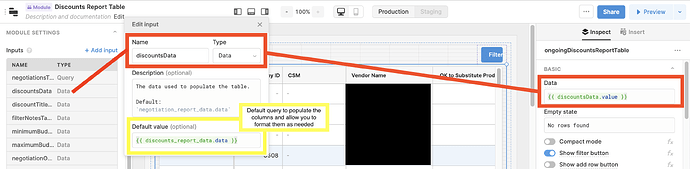
Before native support existed, the recommended workaround was to keep the query in the parent app and pass the result into the module as an input variable. Here's how it works:
- Run your resource-specific query in the parent app (e.g.,
getTableData). - In the module's Inputs section, define a data input variable — something like
inputData. - Set a default value for
inputDatathat includes all possible column names you plan to display. This lets you pre-format thetablecomponent's columns inside the module editor without live data. - In the parent app's module Inspect panel, bind the input variable to your query result:
{{getTableData.data}}.
This approach works and is still valid for simpler cases. The downside is that your query logic lives in the parent app, not the module — so you lose some of the encapsulation you were after. It also gets messy when modules need to trigger their own queries, handle pagination, or react to user interactions inside the module itself.
The Native Solution: Retool's Dynamic Resource ID Toggle (v2.97+)
Retool shipped a beta feature — now available to all Cloud orgs and self-hosted instances on version 2.97 or later — that solves this properly. It adds an fx toggle next to the resource selector on any query inside a module. When you enable it, a Resource ID field appears that accepts any dynamic expression.
This means the query inside your module can target a completely different database at runtime, based on whatever value you pass in. The module stays self-contained; only the resource changes.
How to Set Up a Dynamic Resource ID in a Retool Module
- Step 1: Open the module in the module editor and select the query you want to make dynamic.
- Step 2: Click the
fxtoggle next to the resource name. A Resource ID input field will appear below it. - Step 3: Bind the Resource ID field to a dynamic value. Common options include:
- A dropdown selection in the parent app:
{{select1.value}} - A result from a lookup query:
{{dbLookupQuery.data.db_id}} - A module input variable you define:
{{resourceIdInput}}
- A dropdown selection in the parent app:
- Step 4: Get the correct Resource IDs to reference. There are three ways to find them:
- Manually: Navigate to the resource's configuration page in Retool. The ID is the UUID in the URL — e.g.,
https://demo.retool.com/resources/b49d8ef2-a774-433f-9b5c-cadd2a60c678. - Retool's internal database (self-hosted only): Query the underlying Retool Postgres database to fetch a list of resources and their IDs programmatically.
- Retool API: Hit the
/resourcesendpoint of the Retool REST API to get a filtered list of resources by type.
- Manually: Navigate to the resource's configuration page in Retool. The ID is the UUID in the URL — e.g.,
- Step 5: In the parent app, pass the appropriate Resource ID into the module — either via a hardcoded module input, a user-facing dropdown, or a query result. Save and test.
Which Retool Versions and Plans Support This?
The dynamic resource feature is available on all Retool Cloud organizations. If you're self-hosted, you need to be on version 2.97 or later. If you're on an older self-hosted version and can't upgrade immediately, fall back to the input-data workaround described above while you plan the upgrade.
Tips for Keeping Your Dynamic Module Clean
- Define a
resourceIdmodule input explicitly so parent apps have a clear contract for what to pass in — don't bury the resource ID inside a deeply nested query result if you can avoid it. - Add a fallback default value to the
resourceIdinput so the module renders gracefully in the editor without a live parent app context. - If you're building a multi-tenant internal tool where each tenant maps to a different database, store the resource ID mappings in a lookup table and query it with
{{dbLookupQuery.data.resource_id}}— this keeps the parent app logic minimal and the module fully reusable. - Use the Retool API's
/resourcesendpoint to power a dropdown that lets admins select the target resource at runtime, rather than hardcoding IDs anywhere.
Bottom Line
The fx resource toggle is the right long-term solution for dynamically specifying a resource in a Retool module. It keeps query logic inside the module where it belongs, makes modules genuinely reusable across different databases, and opens the door to more powerful multi-tenant or multi-environment internal tools. If you're on Retool Cloud or v2.97+, enable it and stop duplicating modules. If you're on an older self-hosted version, the input-data workaround will hold you over — but upgrading should be on your roadmap.
Ready to build?
We scope, design, and ship your Retool app — fast.