Guides
Retool Component Library Visual Refresh: What's Changing
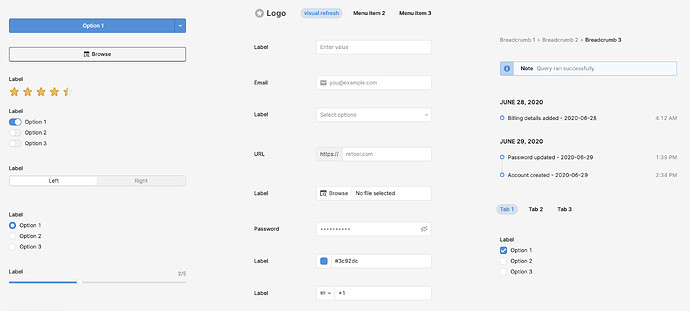
Retool's component library visual refresh is now available in beta for cloud users, and if you've been frustrated by inconsistent spacing, that distinctive blue tint, or the cluttered look of bordered input attachments, this update is worth enabling immediately. Retool's team has overhauled the look and feel of core UI components without breaking existing style overrides — meaning you can opt in without fear of blowing up your current apps.
What Is the Retool Component Library Visual Refresh?
The visual refresh is a beta update to Retool's built-in component styling, announced by the Retool team in the community forum. The goal is to modernize the default appearance of components — buttons, inputs, tabs, navigation, and more — while maintaining backward compatibility with any custom CSS or style overrides you've already applied. If you've overridden a component's style, that override is preserved. This isn't a breaking change; it's a visual upgrade to the defaults.
It is currently available on Retool Cloud only. Self-hosted instances are not yet supported in this beta.
What Exactly Is Changing in the Visual Refresh?
The changes span several areas of the component library. Here's a breakdown of what's new:
- Updated color palette: Retool is moving away from its previous blue tint in favor of a slightly different, more neutral palette. Several community members specifically called out how welcome this change is.
- Button and input hover/active states: The appearance of buttons and inputs when hovered or clicked has been redesigned for a cleaner, more modern feel.
- Borders removed from input attachments and buttons: Unnecessary borders that made components feel heavy or outdated have been stripped out, giving inputs and buttons a cleaner, flatter look.
- Spacing and sizing consistency fixes: Inconsistencies in component spacing, font weight, and border radius have been corrected across the board. This is especially noticeable when components are placed side by side.
- Tabs and Navigation components redesigned: The
TabandNavigationcomponents have a noticeably different look under the refresh, with cleaner active state indicators and improved layout behavior.
Will the Visual Refresh Break My Existing Retool Apps?
This is the first question every developer asks — and the answer is no, it should not break your apps. Retool's team confirmed that pre-existing style overrides are upheld when the refresh is enabled. So if you've used custom CSS on a Button component or manually set border radius on an TextInput, those overrides take precedence and will continue to render as expected.
That said, components where you've relied purely on Retool's default styling will look different. For most teams, this is an improvement — but it's worth doing a quick visual QA pass on your most-used apps after enabling, especially for anything customer-facing or used in live operations.
How to Enable the Retool Visual Refresh for Your Org
The beta is not self-serve yet — you need to request enablement directly from Retool. Here's the process:
- Go to the Retool Community thread titled "New Beta: Visual Refresh of Component Library" and leave a comment with your org's Retool URL (e.g.,
yourorg.retool.com). - Alternatively, DM
brenna.chendirectly on the Retool Community forum with your org URL. - Retool's team will enable the feature for your specific org — turnaround in the thread has been fast, often same-day.
- Once enabled, open any app in your org and the refreshed component styles will be live immediately — no redeployment needed.
Make sure you're on Retool Cloud. If you're self-hosted, this beta is not yet available to you and there's no workaround at this time.
Known Gaps and Community Feedback So Far
The beta is early, and a few rough edges have already surfaced in community feedback. One notable gap: the S3 Uploader button component does not yet reflect the new styling. Community members have flagged this, and it's likely to be addressed before general availability. If your apps make heavy use of the S3 Uploader, keep that in mind when setting expectations with stakeholders.
Overall, reception has been positive. The move away from the legacy blue tint and the cleanup of border inconsistencies are the most praised changes so far.
Should You Enable This Now or Wait?
If you're building new Retool apps or running internal tools where a brief visual shift won't cause issues, enable it now. The refresh is a meaningful improvement to Retool's default UI and aligns components more closely with modern design standards. For teams with polished, production-critical apps, do a quick visual audit first — but don't let that stop you from enabling it in a dev or staging environment to evaluate the changes firsthand.
The Retool component library visual refresh is the kind of update that quietly makes your internal tools look significantly more professional without requiring any redesign work on your end. Get it turned on, run a smoke test, and enjoy the cleaner UI.
Ready to build?
We scope, design, and ship your Retool app — fast.