Guides
Retool Comment Thread Component: Setup, Tips & Use Cases
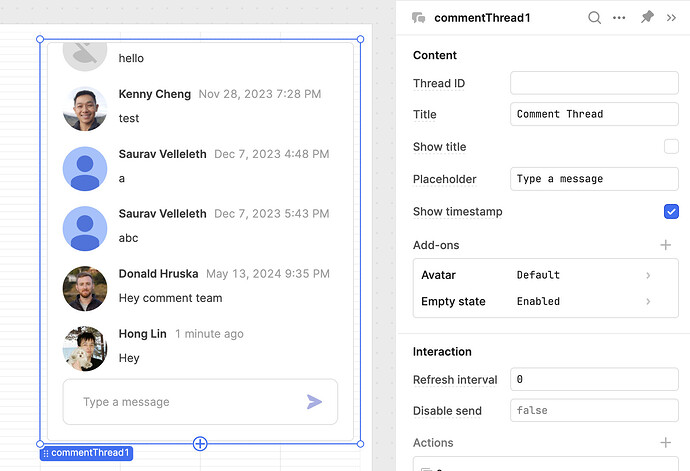
The Retool Comment Thread component is a built-in widget that lets your app users start conversations, post updates, and collaborate — all without leaving your Retool app. Introduced as a major revamp of the older Comments v1 component, it ships with updated APIs, event handlers, and tighter integration with the rest of your Retool components. If you're building internal tools where teams need to leave notes, track incidents, or flag issues on specific records, this component is worth knowing well.
What Is the Retool Comment Thread Component?
The Comment Thread component hosts threaded conversations directly inside a Retool app. Every registered Retool user gets their name and avatar pulled in automatically — no extra configuration needed. You can start new threads or add replies to existing ones, and the component is available on both Retool Cloud and on-prem deployments running version 3.80 and above. Find it by searching "Comment Thread" in the component library inside the editor.
If you were using the older Comment v1 component, you can one-click upgrade to Comment Thread and all your existing conversations carry over intact.
How to Link the Thread ID to a Dynamic Retool Value
This is the most practical thing you can do with the component and the pattern you'll want to use almost every time. Instead of a hardcoded thread ID, bind it to a dynamic value — like the selected row in a table:
- Drop a
Comment Threadcomponent onto your canvas. - Set the Thread ID property to
{{ table1.selectedRow.id }}(replacetable1with your actual table component name). - Now each row in your table gets its own isolated comment thread automatically.
The Thread ID can be either a number or a text string — so you're not limited to integer primary keys. A UUID, a slug, or any unique identifier from your data source will work.
How to Send Email Notifications on New Comments
The Comment Thread's Submit Handler event fires every time a user posts a new comment. You can wire this to a Retool query that sends an email, so your team gets notified without you building a separate notification system.
- Create a query (e.g.,
sendCommentEmail) using an SMTP resource or a service like SendGrid. Configure it to send to relevant thread participants. - Open the Comment Thread component settings and navigate to Event Handlers.
- Add a new event handler for the Submit event and set the action to trigger your
sendCommentEmailquery. - Use
{{ commentThread1.newComment }}or similar exposed values to include the comment body in the email.
This replaces the workflow of copying a record link, switching to Slack or email, and pasting context manually. The conversation lives where the data lives.
How to Make Comments Read-Only After a Record Is Closed
A common request from the community is the ability to lock a thread once a process is complete — for example, making an incident thread read-only after the incident is resolved. The component doesn't have a native read-only toggle yet, but you can approximate this with CSS or conditional rendering:
- Use a hidden or disabled state on the component, driven by a condition like
{{ incidentTable.selectedRow.status === 'closed' }}. - Alternatively, inject custom CSS to hide the input area when a specific app state is true, preserving the comment history while removing the ability to post.
This pattern is especially useful for incident trackers, approval workflows, and audit logs where you want a permanent record without allowing edits after the fact.
Current Limitations to Know Before You Build
The Comment Thread component is powerful but still maturing. Here are the gaps you'll hit in production and how to think about them:
- No external database storage (cloud): On cloud, Retool manages where thread and comment data is stored. On-prem gives you more control, but there's no native way to point the component at your own database table yet. If you need comments in your own schema, you'll need to build a custom UI using standard input and query components.
- No @ mentions: Mentions are on Retool's radar but have no confirmed timeline. In the meantime, the Submit Handler + email workaround covers basic notification needs.
- No nested/threaded replies: The component is flat — there's no Reddit-style nesting. If your use case requires hierarchical replies, you'll need to build that manually.
- No action restrictions: Users can delete their comments at any time. There's no built-in way to make comments sticky or lock them after a time window.
- No sound or unread indicators: There's no native way to trigger a sound or show a badge for new comments. You'd need to build that separately using a polling query and a custom header component.
When to Use Comment Thread vs. Building Your Own
Use the Comment Thread component when your users are all registered Retool users, your conversations are tied to specific records (rows, IDs, entities), and you don't need comments stored in your own database. It covers 80% of internal tool collaboration needs out of the box and takes minutes to set up.
Build a custom comment UI when you need external database storage, fine-grained permissions per comment, nested replies, or read/unread state tracked in your own schema. The custom route is more work but gives you full control over the data model.
Quick Reference: Key Comment Thread Properties
Thread ID— Accepts a number or string. Bind to{{ table1.selectedRow.id }}for per-record threads.- Submit event handler — Fires on every new comment. Use it to trigger email queries or other workflows.
- Availability — Retool Cloud and on-prem 3.80+.
- Upgrade path — One-click upgrade from Comment v1; existing data is preserved.
The Retool Comment Thread component won't replace a dedicated tool like Slack for org-wide communication, but for keeping conversations attached to the records they belong to, it's one of the most practical components in the library. Set it up in an afternoon, wire in email notifications, and your team will stop losing context across tools.
Ready to build?
We scope, design, and ship your Retool app — fast.