Guides
Retool Checkbox Tree Expanded Keys: How to Collapse by Default
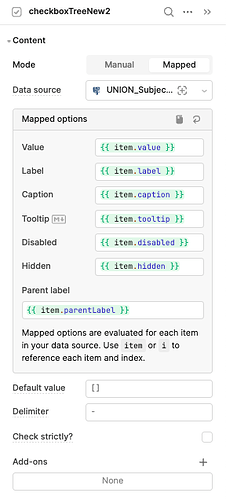
If you've migrated to the new Checkbox Tree component in Retool and can't find the Expanded Keys property, you're not alone. The new component expands and flattens all child nodes by default, and as of now there's no built-in way to set the initial collapsed or expanded state. This is a known gap reported by multiple users in the Retool community, and it's actively tracked as a feature request by Retool's team.
What Is the Expanded Keys Property and Why Does It Matter?
In the original Checkbox Tree component, the Expanded Keys property let you control which nodes were open or closed when the component first rendered. You could default the entire tree to collapsed, or pre-expand only specific branches. This is critical for usability when your tree has a large or deeply nested dataset — showing everything at once is noisy, slow, and in some cases causes rendering errors.
The new Checkbox Tree component was redesigned with a cleaner visual style, but it shipped without this property. Every node expands automatically on load, regardless of how much data you have.
What Happens When You Have a Lot of Data
Users with large datasets are hitting a concrete bug: the new Checkbox Tree throws a rendering error when too many nodes are expanded at once. One user reported the error disappearing only after limiting the amount of data fed into the component. This is a direct consequence of the missing Expanded Keys control — there's no way to tell the component to stop trying to render everything upfront.
If you're seeing an error in your Checkbox Tree and your dataset is large, the expanded-by-default behavior is likely the culprit. Reducing the data passed into the component is the only confirmed workaround at this time.
Why the New Checkbox Tree Is Missing This Feature
The new Checkbox Tree is a rebuilt component, not an upgrade of the original. Retool rebuilt it for a cleaner UI and better long-term maintainability, but not all properties from the legacy component were carried over in the initial release. The Expanded Keys property is one of several that didn't make it into v1 of the new component.
Retool has confirmed the feature request is filed and being tracked. There's no public ETA, but the Retool team has committed to updating the community thread when the status changes.
Your Options Right Now
Until Retool ships the Expanded Keys property on the new component, here are your practical options:
- Use the original Checkbox Tree component. The legacy component still supports
Expanded Keysand nested arrays. If your app depends on collapsed-by-default behavior, don't migrate yet. Retool's own team recommends this in the community thread. - Limit the data you pass in. If you must use the new component, reduce the dataset to a manageable size to avoid the rendering error. Use a query with filtering, pagination, or a
LIMITclause to cut down the number of nodes. - Pre-process your data structure. Some teams flatten or restructure their tree data before passing it to the component, which reduces the number of nested levels and makes the fully-expanded view less overwhelming.
- Upvote the feature request. Head to the
Retool Communitythread and add your voice. The more signal Retool gets, the faster this gets prioritized.
How to Keep Using the Original Checkbox Tree
If you're building a new app or haven't switched yet, here's how to make sure you're using the component that still supports Expanded Keys:
- In the Retool canvas, open the component picker and search for Checkbox Tree.
- If two versions appear, select the one labeled as the original or legacy version.
- In the right-hand panel, look for the
Expanded Keysproperty under the component's configuration options. - Pass in an array of node keys you want expanded by default — or pass an empty array
[]to start fully collapsed. - The original component also supports nested array data structures, which the new component has dropped support for. If your data is structured as nested arrays rather than a flat list with parent references, stay on the original.
What to Expect From Retool Going Forward
Retool's pattern with rebuilt components is to ship the new version, gather feedback, and iterate. The Expanded Keys gap is well-documented at this point — multiple users have hit it independently for different reasons: UX preference, performance, and outright rendering errors. That's a strong case for prioritization.
When Retool does ship the fix, expect the Expanded Keys property to appear in the new Checkbox Tree's right-panel configuration, likely accepting an array of key strings just like the original. Keep an eye on Retool's release notes and the community thread for updates.
Bottom Line
The new Checkbox Tree in Retool does not support Expanded Keys or collapsed-by-default behavior yet. If your use case requires controlling the initial expanded state — especially with large or deeply nested datasets — stick with the original Checkbox Tree until the feature is added. It's not a workaround to be embarrassed about; it's the right call given where the new component currently stands.
Ready to build?
We scope, design, and ship your Retool app — fast.