Tips
Retool Assist Prompts That Build Apps in Under 30 Minutes
Retool Assist prompts can mean the difference between a blank canvas and a fully wired internal tool in under 30 minutes. Since Retool launched Assist (its AI-powered app generation feature), builders in the community have been sharing prompts that generated real, production-ready apps — complete with tables, modals, CRUD logic, and styled UIs. This post breaks down the best ones, what made them work, and how to write prompts that get strong first attempts instead of frustrating back-and-forth.
What Is Retool Assist and What Can It Actually Build?
Retool Assist is an AI agent built into Retool that lets you describe an app in plain language and generates the UI, queries, and component logic for you. It connects to your existing Retool DB tables, APIs, and data sources — so you're not starting from scratch on the data layer either. Based on real community results, Assist can generate a functional app with search, modals, and CRUD operations in under 25 minutes. The catch: the quality of your output is almost entirely determined by the quality of your prompt.
Real Retool Assist Prompts That Actually Worked
These prompts come directly from Retool's community Prompt Pro Challenge. Each one produced a working app with minimal manual fixes afterward.
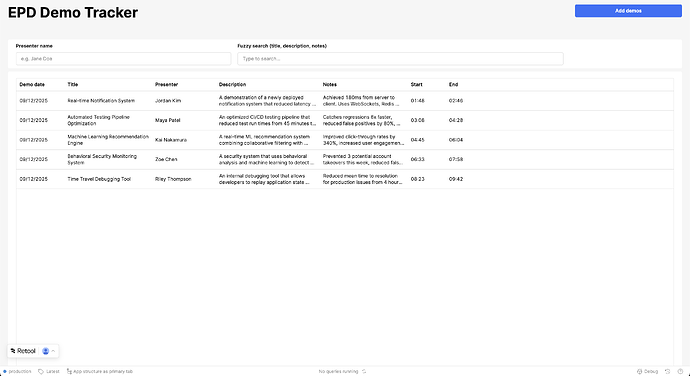
Prompt 1: EPD Demo Tracker (Built in 22 Minutes)
Builder KeananKoppenhaver estimated this tool would have taken 2–3 hours to build manually. With Assist, it took 21 minutes and 57 seconds — with roughly 70% generated and 30% manual tweaks. Here's the exact prompt:
I want to build an EPD demo tracker. Use the epd_demos table in Retool DB. UI: A table for all data with search by presenter name or fuzzy search in title, description, or notes. An add modal with a large text area to paste a transcript, an input for recording link, and date. An edit modal triggered by a row action.
What made this prompt work: it named a specific Retool DB table, described the exact UI components needed (table, modals, inputs), specified trigger behavior (row action), and defined search logic (fuzzy vs. exact). The more Assist knows about your data source and interaction model upfront, the less it has to guess.
Prompt 2: Audience Engine SaaS Interface (Built in Under 25 Minutes)
Builder mustofa_shonen took a different angle — leading with design intent as much as functionality. The prompt specified typography (Space Grotesk, Inter), color palette, layout sections, and even anti-patterns to avoid (no shadows, no gradients). The result was a single-page CRUD app with a slide-in panel, audience profile table, and AI-generated insights — styled to match a Stripe/Notion aesthetic.
Key lesson: if your app has a strong design requirement, describe it explicitly. Assist responds well to design system language — typefaces, spacing philosophy, color tokens, and component hierarchy.
Prompt 3: Content Strategy Dashboard with Structured AI Output
Builder Emmanuel_Steve used a more advanced prompting pattern — treating the Assist prompt almost like a system prompt for the AI logic embedded in the app itself. The prompt defined a content strategist persona, listed exact actions (clarify, outline, draft, repurpose), specified JSON output structure, and even dictated channel-specific formatting rules for X, LinkedIn, and YouTube.
This approach works well when your app involves an AI-powered workflow with strict output requirements. Defining the JSON schema in the prompt prevents the model from hallucinating field names or returning freeform text where structured data is expected.
How to Write Retool Assist Prompts That Get Strong First Attempts
Across all the successful examples, a clear pattern emerged. Here's a repeatable framework:
- Name your data source explicitly. Saying
use the epd_demos table in Retool DBis far more useful than "pull from our database." Assist can connect to named tables and resources — use that. - List every UI component you need. Tables, modals, buttons, dropdowns, text areas — name them. Don't assume Assist will infer what "a nice interface" means.
- Describe interaction logic. How is a modal triggered? What does a button do? What filters the table? Specify the behavior, not just the look.
- Add a clarification instruction. Builder jamesg31 shared a prompt snippet that significantly reduced back-and-forth:
Ask for clarification when there is ambiguity. DO NOT make assumptions. Before starting work or making changes, ask questions to ensure you understand the requirements and intended output.Adding this to complex prompts lets Assist surface gaps before generating bad code rather than after. - Specify what you don't want. mustofa_shonen's prompt explicitly said "avoid shadows, gradients, bright colors." Negative constraints are just as useful as positive ones.
What Happens When You're Too Vague
Builder kimweller shared a cautionary example: a very vague initial prompt caused Assist to build an entire app on its own, making many assumptions — some helpful, some not. The fix was hand-holding it through more detailed, step-by-step asks. This is expected behavior for any LLM-based tool. Vague input produces confident but incorrect output. The more specific your prompt, the less cleanup you'll do afterward.
Does Retool Assist Work in Non-English Prompts?
Yes — builder g.hawsen tested Assist with a Japanese prompt asking it to build a cat photo viewer using an external API. It worked. The app displayed a new cat image on each button press. This suggests Assist's underlying model handles multilingual prompts reasonably well, which matters for international teams building internal tools in Retool.
The Bottom Line on Retool Assist Prompts
Retool Assist is not magic — it's a force multiplier. The builders who got the best results treated their prompts like a junior developer handoff: specific enough that someone could build it without asking follow-up questions. Name your tables, describe your components, define your interactions, and tell it what to avoid. Do that, and you can realistically ship a working internal tool in under 30 minutes. Skip that, and you'll spend more time editing than you would have building from scratch.
If you're building internal tools with Retool and want help designing prompts, data models, or full custom apps — that's exactly what we do. Reach out to our team to talk through your use case.
Ready to build?
We scope, design, and ship your Retool app — fast.