Guides
Fix: moment.tz.names() Returns Empty Array in Retool
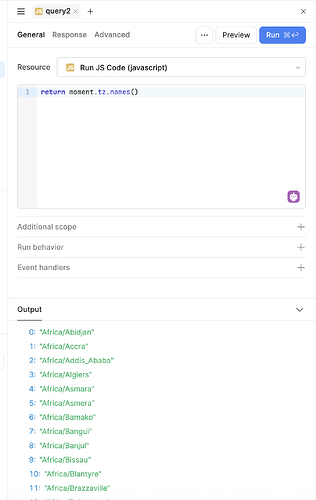
If moment.tz.names() is returning an empty array in Retool and moment.tz.guess() is returning undefined, your app's timezone logic has almost certainly broken silently. This is a known issue caused by Retool's preloaded moment-timezone library shipping without its timezone data — and it can happen suddenly, even if your code hasn't changed at all. Here's exactly what's going on and how to fix it fast.
What's Causing moment.tz.names() to Return an Empty Array?
Retool bundles a version of moment-timezone as a preloaded library. The problem is that this bundled version has, at times, shipped without the accompanying timezone database. The moment-timezone package is split into two parts: the core library and the timezone data. When only the core is loaded — without the data — calls like moment.tz.names() return [], moment.tz.guess() returns undefined, and converting timestamps to a specific timezone silently falls back to the local system timezone instead.
You may also see this error in your browser console:
Moment Timezone found America/Toronto from the Intl api, but did not have that data loaded.
This confirms the library is loaded but the timezone data is missing entirely.
How to Reproduce the Bug in Retool
Open any Retool app and run the following snippet in a JavaScript query or the browser console:
moment(1752015600000).tz("America/Los_Angeles")
If the output shows a time in Eastern Daylight Time (or whatever your local timezone is) instead of Pacific Time, the timezone data is not loaded. The .tz() call is being silently ignored. You can also run moment.tz.names() directly — an empty array confirms the issue immediately.
Workaround 1: Load moment-timezone via CDN (Recommended)
The cleanest fix — and the one that requires zero changes to your existing query logic — is to manually load a complete build of moment-timezone (core + all timezone data) as a custom library in your Retool app or at the global organization level.
- Go to your Retool app's Settings panel (or the org-level Resource settings for a global fix).
- Navigate to Libraries (sometimes listed under "Custom libraries" or "Preloaded libraries").
- Add the following CDN URL as a new library:
https://cdnjs.cloudflare.com/ajax/libs/moment-timezone/0.5.43/moment-timezone-with-data.min.js
- Save and reload your Retool app.
- Test with
moment.tz.names()— it should now return a full list of IANA timezone names.
The key detail here is to use the moment-timezone-with-data build, not the bare moment-timezone build. The "with-data" variant bundles all timezone definitions into a single file, which is exactly what Retool's broken preload is missing. Because this library overwrites the incomplete preloaded version, none of your existing moment.tz() calls need to change.
Workaround 2: Switch to the Intl API
If you can't add a custom library (e.g., you're on a restricted Retool plan or need a fast one-off fix), the native Intl.DateTimeFormat API is a solid fallback. It's built into every modern browser and doesn't depend on any external library.
Replace a call like moment(timestamp).tz("America/Los_Angeles").format(...) with:
Intl.DateTimeFormat('en-US', { timeZone: 'America/Los_Angeles', dateStyle: 'medium', timeStyle: 'short' }).format(1752015600000)
This approach works reliably right now and respects IANA timezone identifiers. The downside is that Intl.DateTimeFormat has a different API surface than moment, so you'll need to update any code that chains moment-specific methods like .add(), .subtract(), or .diff(). For simple display formatting, though, it's a low-effort swap.
Which Fix Should You Use?
- Use the CDN fix if you have multiple queries or transformers relying on
moment.tz— it's a one-time change that restores everything with no code edits. - Use the Intl workaround if you need a targeted, library-free fix for one or two specific formatting calls.
- Add the CDN globally (org-level libraries) if multiple apps in your Retool instance use
moment-timezone— this prevents the issue from resurfacing in other apps without touching each one individually.
Is Retool Working on a Fix?
This issue has been reported to Retool's team and is being investigated. The root cause is that Retool's internal upgrade of the moment-timezone preload stripped out the timezone data bundle. Until an official patch is deployed, the CDN workaround above is the most reliable path forward. Monitor the original community thread for status updates from the Retool team.
Key Takeaways
moment.tz.names()returning[]in Retool means the timezone data file was not loaded — the library core is present but empty.- The fastest fix is adding
moment-timezone-with-data.min.jsfrom a CDN as a custom library in your app settings. - The
Intl.DateTimeFormatAPI is a viable, dependency-free alternative for simple timezone-aware formatting. - Apply the CDN fix at the org level to protect all apps at once.
Ready to build?
We scope, design, and ship your Retool app — fast.