Tutorials
How to Pull All Data from a Paged REST API in Retool
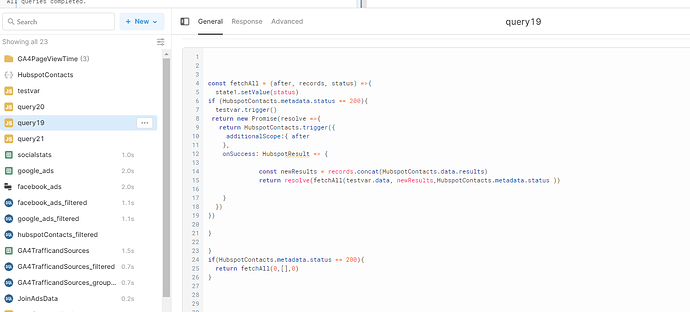
If you're trying to pull all data from a paged REST API in Retool, you've probably already hit the wall: your API returns 100 records at a time, doesn't support server-side filtering or sorting, and you have no idea how many pages exist until you hit the last one. This is one of the most common pain points in Retool — and it has a clean solution once you understand the pattern.
Why Paginated APIs Are Tricky in Retool
Most REST APIs paginate their responses to protect server performance. Some use offset-based pagination (page 1, page 2, etc.), while others use cursor-based pagination — returning a token like after or next_cursor that points to the next page. The challenge in Retool is that a standard query only fires once. To walk through all pages, you need to loop — and loops in Retool require a recursive JavaScript query pattern.
Without getting this right, you'll either fetch only the first page, end up with undefined results, or — the most frustrating outcome — create an infinite loop that never stops and hammers your API with requests until it returns a 400 error.
The Core Pattern: Recursive JavaScript Query
The solution is to write a JavaScript query in Retool that calls your REST API query, checks whether more pages exist, and calls itself again if they do. Here's the general structure:
- Start with an empty accumulator array to collect results across pages.
- Fire your REST API query with the current cursor or page number.
- Append the returned records to the accumulator.
- Check whether the response signals more pages (e.g., fewer than 100 results, or no
nextcursor present). - If more pages exist, update the cursor and recurse. If not, resolve with the full dataset.
A common mistake — flagged directly by Retool community members — is declaring your pagination cursor as a const outside the resolve block. If the cursor is defined as a constant at the top level, there's no code path where it can ever be null or empty, so the loop condition never triggers an exit. Always define your cursor inside the resolution logic where it can genuinely be null when the last page is reached.
How to Handle Cursor-Based Pagination (e.g., HubSpot)
APIs like HubSpot return an after cursor in the response body alongside a next link. Here's how to handle this pattern step by step:
- Step 1: Create a REST API query in Retool (e.g.,
HubSpotContacts) with a query parameter for the cursor, such asafter. Set its default value to an empty string''so the first call fetches page one. - Step 2: Create a JavaScript query (e.g.,
fetchAllPages) that triggersHubSpotContactsusingHubSpotContacts.trigger(). - Step 3: In the
.then()callback, check whether a next cursor exists. For HubSpot, this lives atresponse["paging"]["next"]["after"]— note the use of bracket notation since the key contains a hyphen or special character. - Step 4: If the cursor exists, update your cursor variable and call
fetchAllPages.trigger()again to recurse. - Step 5: If the cursor is absent (or the result count is less than your page size), resolve the promise with the accumulated data array.
Use JSON bracket notation (e.g., data["paging"]["next"]["after"]) rather than dot notation when your API response keys contain hyphens or reserved characters. This is a subtle bug that's easy to miss and will silently return undefined instead of the cursor value.
How to Know When You've Reached the Last Page
There are two reliable signals that you've fetched all the data:
- Result count is below the page size: If your API returns 100 records per page and the current page returns fewer than 100, you're on the last page. Stop the loop.
- No next cursor in the response: Cursor-based APIs omit the
nextobject entirely on the final page. Check for this with a conditional likeif (!response.paging || !response.paging.next)before recursing.
Do not rely on HTTP status codes to control your loop. As noted in community reports, the status from a previous query call doesn't update in real time within the same JavaScript execution context, making it an unreliable signal to break out of a recursive pattern.
Putting It All Together
Once your JavaScript query resolves with the full dataset, store it in a state variable or return it directly for use in a Table or transformer. From there, you can apply client-side filtering and sorting on the complete dataset — which is the whole point when your API doesn't support those features server-side.
If you're building a transformer to sort or filter the data, reference the resolved output of your JavaScript query (e.g., fetchAllPages.data) and use standard JavaScript array methods like .filter(), .sort(), and .map() to shape the data before it hits your UI components.
Common Mistakes to Avoid
- Declaring the pagination cursor as a
constoutside the recursive callback — it will never be null and the loop will never exit. - Using dot notation on response keys that contain hyphens — use bracket notation instead.
- Relying on query HTTP status codes to break the loop — check the response body instead.
- Forgetting to pass the initial cursor as an empty string
''— this ensures the first request goes through without a cursor parameter error.
Getting recursive pagination working in Retool takes a bit of wiring, but once the pattern clicks, you can apply it to any paged REST API — HubSpot, Salesforce, Jira, or any custom internal service. Nail the exit condition, watch your cursor declaration scope, and you'll have the full dataset in hand ready to sort, filter, and display exactly how your users need it.
Ready to build?
We scope, design, and ship your Retool app — fast.